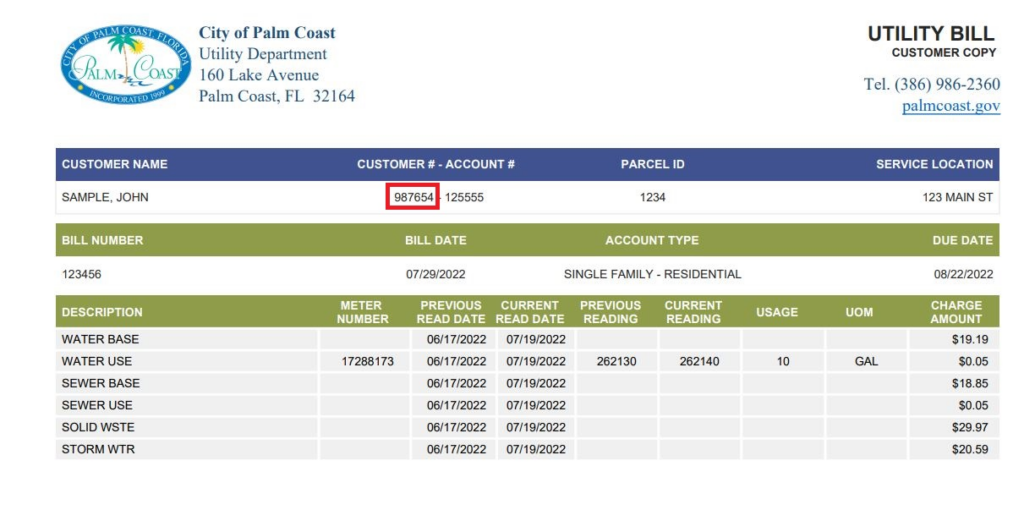
Palm Coast Utilities (City of Palm Coast, Florida) provides water, sewer, and irrigation services to residents. The city uses the Paymentus portal for secure online bill payments, one-time guest payments, AutoPay enrollment, and paperless (eBill) options. You can also pay through your bank’s bill pay service or in person at City Hall.
Quick Pay Links:
How to Pay Your Palm Coast Utilities Bill
Guest Pay / One-Time Payment (No Full Login Required)
- Visit the Pay Now page: https://ipn.paymentus.com/rotp/plmc?lang=en
- Enter your account information or service address.
- Select your payment method and complete the transaction securely.
This is ideal for quick one-time payments without creating an account.
Login to Customer Portal (Recommended)
- Go to the Customer Portal: https://ipn.paymentus.com/cp/plmc
- Sign in or register to view your bill, payment history, usage, and manage recurring payments.
- Once logged in, you can store payment methods in your wallet and receive email/text notifications.
Tip: Use Palm Coast Connect at palmcoast.gov/connect for additional utility services and case reporting.
Pay by Phone
Call the 24/7 automated payment system at 386-986-2360. You can pay using a bank account, credit card, or debit card. Live customer service representatives are also available during business hours at the same number.
In-Person / Pay in Store
Visit City Hall to pay with cash or check: Address: 160 Lake Avenue, Palm Coast, FL 32164 Hours: Monday–Friday, 8:00 a.m. – 5:00 p.m.
A secure drop box is available at the front entrance for after-hours payments. Note: Credit/debit card payments in person incur a convenience fee (check current rates).
Mailing Address: City of Palm Coast 160 Lake Avenue Palm Coast, FL 32164
Make checks payable to City of Palm Coast and include your account number.
Mobile App
There is no dedicated Palm Coast Utilities mobile app. Use your mobile browser to access the Paymentus portal or Palm Coast Connect for bill pay and service requests. The city also offers a general city app for notifications and reporting issues.
Payment Methods and Fees
- Bank account (ACH/e-Check): Lowest cost option, often no extra fee.
- Credit/Debit Card: Convenience fees apply (e.g., around $1.95 per transaction online/phone; higher for in-person).
- AutoPay: Recommended to avoid late fees — enroll in the portal (free for bank draft).
- Pay through your bank’s bill pay service (free for most banks).
Late Payments: Pay on time to avoid penalties. Enroll in AutoPay and eBill (paperless) for convenience and notifications. Financial assistance or payment arrangements may be available — contact customer service.
Contact Information
- Customer Service / Billing: 386-986-2360 (24/7 automated; live support during business hours)
- Email: [email protected]
- Physical Address: City Hall, 160 Lake Avenue, Palm Coast, FL 32164
- Website: palmcoast.gov
Palm Coast Connect: Use for reporting issues, starting/stopping service, and more at palmcoast.gov/connect.
FAQs
How do I pay my Palm Coast Utilities bill online?
Use the Pay Now link for guest one-time payments or log into the Customer Portal to view bills and manage payments. Bank account or card options are available.
Is there a guest pay option for Palm Coast utility bills?
Yes. The “Pay Now” feature allows quick one-time payments without full registration.
What payment methods are accepted?
Bank account (ACH), credit/debit cards, cash/check (in person or mail). AutoPay from your bank is free and recommended.
Can I pay my Palm Coast Utilities bill by phone?
Yes. Call 386-986-2360 (24/7 automated system) to pay with bank account or card.
Where can I pay my Palm Coast Utilities bill in person?
At City Hall, 160 Lake Avenue, Palm Coast, FL 32164 (Monday–Friday, 8:00 a.m.–5:00 p.m.). A drop box is available for after-hours check/cash payments.
Is there a mobile app for Palm Coast Utilities bill pay?
No dedicated utility app exists. Access the Paymentus portal via your mobile browser or use Palm Coast Connect for service requests.
How can I avoid convenience fees and late payments?
Use bank account (ACH) or your bank’s bill pay service. Enroll in free AutoPay and eBill (paperless) through the customer portal.
Tip: Keep your account number or service address handy for faster payments. Log into the portal regularly to monitor your balance, enroll in notifications, and avoid extra fees. For the most current rates, fees, or utility updates (including recent rate adjustments), visit the official City of Palm Coast website at palmcoast.gov.