Duquesne Light Company provides reliable electricity to customers in western Pennsylvania. Customers can pay bills securely online via the My Account portal, by phone at 412-393-7100, mail, or in person, with auto-pay and e-Bill options to avoid late fees and simplify management.
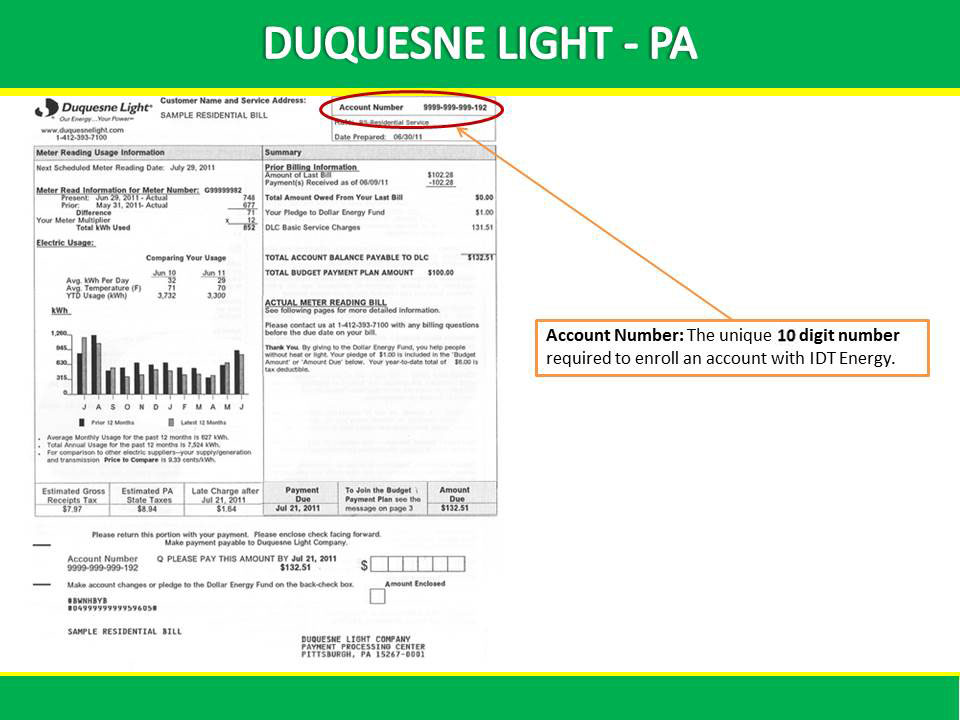
Learn how to pay your Duquesne Light bill, set up auto payments, view statements, and contact support using the official links below.
Duquesne Light – Payment Options
https://www.duquesnelight.com/account-billing/payment-options
Explore convenient ways to pay, including automated, one-time, and online options.
My Account – Login & Register
https://www.duquesnelight.com/account-billing/my-account
Log in or register to view bills, pay online, and enroll in auto-pay. Use your account number to get started.
Payment Options
1. Pay Online via My Account Portal
- Website: Log in at duquesnelight.com/account-billing/my-account and select “Pay Bill.”
- Features:
- One-time or recurring payments; enroll in auto-pay for automatic deductions.
- View current and past bills, payment history, and usage details.
- Secure 24/7 access with real-time confirmation.
- Payment Methods: Debit/credit card (Visa, MasterCard, Discover, American Express) or bank account (ACH/eCheck).
- Enrollment: Register with your account number from your bill; no fees for auto-pay.
- Note: Payments post immediately; e-Bill available for paperless statements.
2. Pay By Phone
- Phone Number: Call 412-393-7100 (residential) or 412-393-7300 (business) for payments (automated system 24/7; live agents Mon-Fri 8 a.m.-5 p.m. ET).
- Accepted: Debit/credit card or bank account.
- Process: Provide account number, select amount, and enter payment details; instant confirmation available.
3. Pay By Mail
- Mailing Address: Duquesne Light Company PO Box 371324 Pittsburgh, PA 15250-7324
- Instructions: Include payment stub with check or money order (payable to Duquesne Light); write account number on check. Allow 7-10 days for processing.
4. Pay In Person
- Locations: Authorized payment centers (e.g., Western Union, MoneyGram sites) or Duquesne Light offices; find via website locator.
- Accepted: Cash, check, debit/credit card.
- Note: Fees may apply at third-party locations.
5. Payment via doxo
- doxo.com: Pay with credit/debit card, Apple Pay, or bank account. Free for bank transfers; fees may apply for cards.
Account & Billing Support
- Customer Service Phone: 412-393-7100 (residential) or 412-393-7300 (business) (Mon-Fri 8 a.m.-5 p.m. ET); TTY: 711.
- Outage/Emergency: 412-393-7000 (24/7).
- Email/Chat: Use secure messaging in My Account or live chat on the website.
- Address: Duquesne Light Company, PO Box 371324, Pittsburgh, PA 15250-7324.
Assistance Programs
- Dollar Energy Fund: Apply for emergency assistance starting October 1; helps with overdue bills.
- Budget Billing: Enroll for equal monthly payments based on annual usage; annual true-up.
- Payment Arrangements: Contact customer service for plans if facing hardship.
FAQs
How can I pay my Duquesne Light bill online?
Log in to My Account at duquesnelight.com and select “Pay Bill” for one-time or auto-pay options using card or bank account.
How do I pay my Duquesne Light bill by phone?
Call 412-393-7100 (residential) or 412-393-7300 (business), provide your account number, and follow prompts for card or bank payments.
What is the customer service phone number for Duquesne Light?
For billing and payments: 412-393-7100 (residential) or 412-393-7300 (business). For outages: 412-393-7000.
How do I set up auto-pay?
Register for My Account, go to “Payments,” select auto-pay, choose your method, and set the deduction date—no fees.
How do I report an outage?
Call 412-393-7000 or use the outage map in My Account.
Tips for Managing Your Duquesne Light Bill
- Enroll in auto-pay and e-Bill via My Account to avoid late fees and receive statements digitally.
- Pay by the due date to prevent disconnections; use Budget Billing for even payments.
- Apply for Dollar Energy Fund if needed, especially starting October 1.
- Save confirmation numbers and monitor usage in the portal to save energy.
- Use official channels only to avoid scams; Duquesne Light does not request payments via unsolicited calls or texts.
Duquesne Light offers flexible bill pay options—call 412-393-7100 for phone payments or use My Account for online convenience!