Pay your Whitetail Disposal (Casella) trash bill online through the Soft‑Pak portal, set up Auto‑Pay, or use doxo, phone, and mail options.
Sign in or register for Whitetail Disposal online bill pay
Whitetail Disposal billing support & payment help
Online Bill Pay Portal
Whitetail Disposal uses a Soft‑Pak web portal for secure online payments and account management.
- Log in to view open invoices, current balance, and payment history, and to make one‑time payments 24/7.
- Access the portal from the “View your account and make payments online” link on Whitetail’s site or directly via the Soft‑Pak URL.
Registering a New Online Account
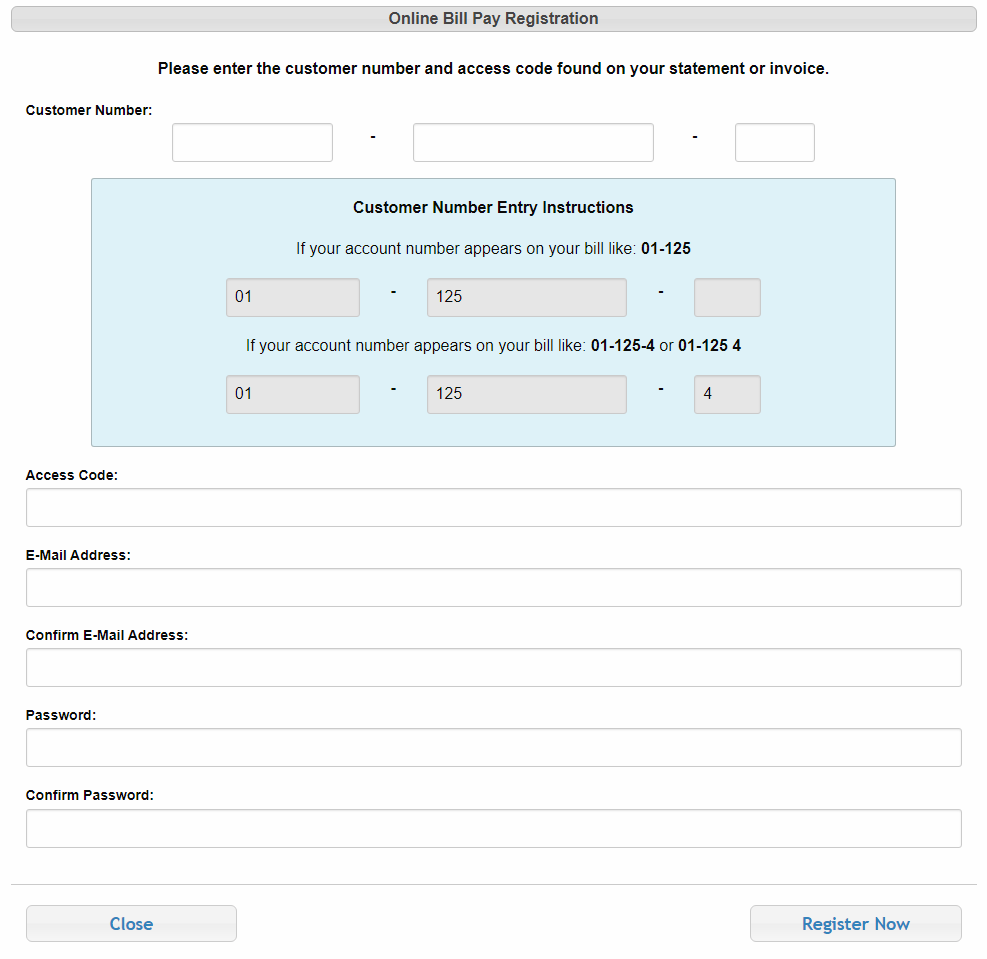
You need details from your statement to register.
- Find your Customer Number and Access Code on your Whitetail invoice or quarterly statement.
- Click “Register Now” on the portal, enter your email, password, customer number, and access code, agree to the terms, and complete registration.
Once registered, you can log in anytime to pay and manage your billing preferences.
Auto‑Pay (Automatic Trash Bill Payments)
You can enroll in Auto‑Pay so bills are paid automatically each cycle.
Set Up Auto‑Pay Online
- Sign in to the online portal and click the “Autopay Enrollment” button.
- In “Select Payment Method”, click “Add New” to add a card or bank account.
- Enter your payment details, check “I agree to the Terms and Conditions,” then click “Add Payment.”
- Select your new payment method, agree to the terms again, and click “Select” to finalize Auto‑Pay enrollment.
Your future Whitetail invoices will then be charged automatically on schedule, so you no longer need to mail checks or call in payments.
Enroll in Auto‑Pay by Phone
If you prefer, you can enroll by phone.
- Call 610‑754‑0103, press 1 for residential, and ask to set up Auto‑Pay on your account.
Other Ways to Pay
doxo All‑in‑One Bill Pay
Whitetail bills can be paid through doxo, an independent bill‑pay app.
- Pay with a linked bank account (often free), credit card, debit card, or Apple Pay, and manage multiple bills in one place.
- doxo offers mobile apps and email alerts, but some payment methods (especially cards/wallets) may have additional service fees.
Pay by Mail
You can mail your payment using the remit address printed on your invoice.
- Use the mailing address and coupon shown on your Whitetail/Casella bill and write your Customer Number on checks or money orders.
- Mail 7–10 days before the due date to allow for postal processing.
Billing Help by Phone
Whitetail’s team can help with billing questions and portal support.
- Customer service / billing: 610‑754‑0103 (residential and commercial).
Call for:
- Balance and due‑date questions
- Auto‑Pay setup and changes
- Help finding your customer number/access code
- Clarifying extra charges (extra bags, bulk items, etc.)
Late & Admin Fees
Whitetail (Casella) may apply admin and late fees to past‑due accounts.
- An account is past due if payment is not received by the due date on your invoice or statement.
- Admin and late fees are intended to offset the cost of managing delinquent accounts and will not exceed what is allowed by law.
Enrolling in Auto‑Pay or paying promptly through the portal helps you avoid these additional charges.
Contact & Support
For billing support or account changes:
- Phone: 610‑754‑0103.
- Email: [email protected].
- Mailing address:
Casella – Whitetail Disposal
334 Layfield Rd
Perkiomenville, PA 18074
You can also use the Contact form on Whitetail’s website for non‑urgent questions or service requests.