Quest Diagnostics provides laboratory testing services across the United States. Patients can view and pay their lab bills securely through Quest’s official online billing system.
- For quick access to your bill and payment options, visit the official Quest Diagnostics billing and insurance page at https://www.questdiagnostics.com/patients/billing-insurance.
- To pay your bill directly, go to https://questdiagnostics.com/bill (you may be redirected to MyDocBill.com depending on your lab code).
Guest / One-Time Payment
Quest Diagnostics allows patients to pay their bill without creating a full MyQuest account. This guest-friendly option is available through the official billing portal.
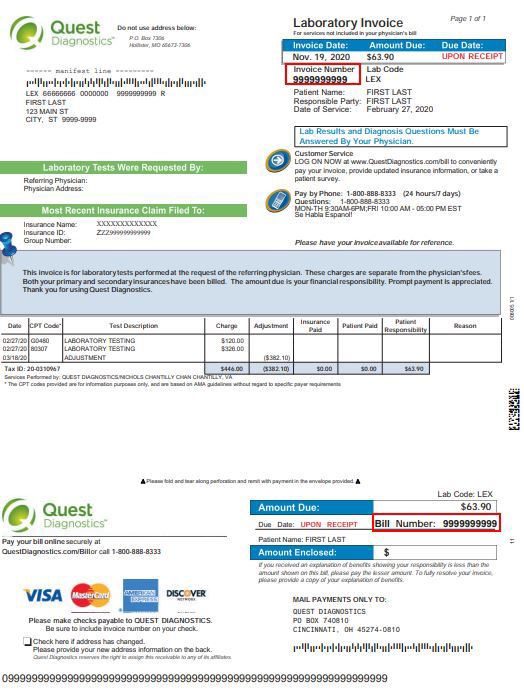
Visit https://questdiagnostics.com/bill and enter the bill number (usually a 10- or 12-digit number) from your paper statement along with other required details such as your date of birth or ZIP code. You can then view your balance and make a secure one-time payment using a credit card, debit card, or electronic bank transfer.
This method is ideal for quick payments without setting up recurring account access.
Online Account Payments (MyDocBill / Quest Portal)
For full account management, log in or create an account through Quest’s billing services provider, often MyDocBill.com.
Once logged in, you can:
- View current and past bills
- Make one-time or recurring payments
- Update insurance information
- View payment history
- Set up payment plans (when available)
Having a MyQuest account can speed up the process by automatically locating your bills.
Pay by Phone
You can pay your Quest Diagnostics bill or ask billing questions by calling 1-866-MYQUEST (1-866-697-8378).
Have your bill number ready. Representatives can assist with payments, payment arrangements, and financial assistance programs during business hours. Use the specific phone number printed on your statement for the most accurate support for your region.
Pay by Mail
Mail your payment with the payment coupon from your bill to the address listed on your statement.
Always include:
- The Payment Coupon
- Your bill number written on the check or money order
Quest recommends using the exact “Send Payments To” address on your current bill, as mailing addresses can vary by region or lab location.
Payment Plans and Financial Assistance
Quest Diagnostics offers payment plans for patients who cannot pay the full balance at once. Plans typically allow monthly installments.
To set up a plan:
- Call the billing number on your statement or 1-866-697-8378
- Explain your situation and request a payment arrangement
In some cases, patient financial assistance programs may be available. Ask billing representatives for details and eligibility requirements.
Additional Notes
Quest Diagnostics strongly recommends paying directly through their official portals (questdiagnostics.com/bill or MyDocBill) for the fastest processing and to avoid extra fees from third-party services.
Third-party bill pay services (such as doxo) may charge additional fees and can delay payment posting. Always verify you are on an official Quest site (URL begins with https://questdiagnostics.com or mydocbill.com).
Each bill has a unique bill number. Using the correct number ensures your payment is applied to the right account.
Frequently Asked Questions
How do I pay my Quest Diagnostics bill online? Go to https://questdiagnostics.com/bill and enter the bill number from your statement. You may be directed to MyDocBill.com to complete payment with a credit/debit card or bank transfer.
Can I pay without creating an account? Yes. Use the guest payment option at https://questdiagnostics.com/bill. Enter your bill number and required details to make a one-time payment without full account registration.
What phone number should I call to pay my bill? Call 1-866-697-8378 (1-866-MYQUEST). Use the specific number printed on your bill for the most accurate support.
Where do I mail my Quest Diagnostics payment? Mail your payment and coupon to the “Send Payments To” address on your current bill. Always include your bill number on the check.
Does Quest offer payment plans? Yes. Contact billing at the number on your statement or 1-866-697-8378 to set up a monthly payment plan if you cannot pay the full amount immediately.