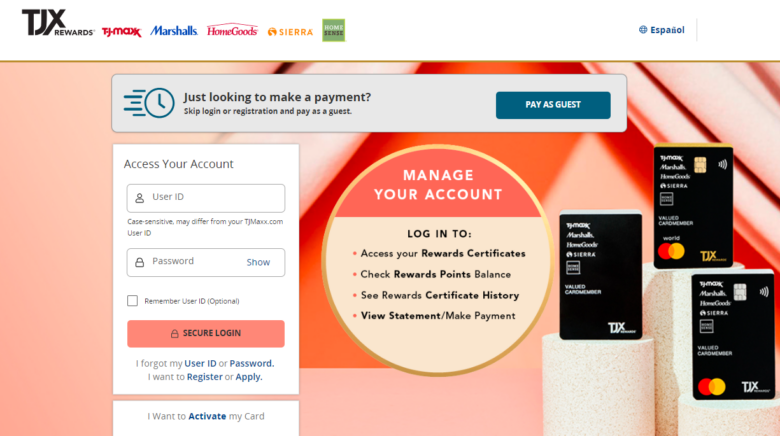
You can pay your TJX Rewards Credit Card or TJX Rewards Platinum Mastercard bill online, by phone, by mail, or through the TJX store apps, all managed by Synchrony Bank.
1. Online Payment (Fastest Option)
- Go to tjx.syf.com or tjxrewards.com and sign in to your Synchrony/TJX account.
- Select your TJX Rewards card, click Make a Payment, choose your amount (minimum, statement balance, or custom), pick your payment date, and select your bank account to pay from.
- You can save a checking account for future use and schedule same‑day or future‑dated payments.
Pay as Guest (no login):
- Use Synchrony’s Pay as Guest at synchrony.com/consumer-resources/pay-as-guest.
- Enter your card account number and the last four digits of your SSN, verify your identity, then submit a one‑time payment from your bank account.
2. Pay by Phone
- TJX Rewards Credit Card (store card): (800) 952‑6133
- TJX Rewards Platinum Mastercard: (877) 890‑3150
You can call 24/7 to use the automated system or speak with a live agent. Synchrony typically does not charge a fee for automated phone payments, but may charge a convenience fee if a live representative processes the payment for you, depending on your account terms.
3. Pay by Mail
Mail a check or money order made payable to TJX Rewards Credit Card:
TJX Rewards Credit Card
P.O. Box 669818
Dallas, TX 75266‑0772
- Write your full account number in the memo line.
- Mail early enough to arrive before your due date; mail time and processing can take several days.
(If your statement lists a different remittance address, always follow the address printed on your bill, as some products or regions can vary.)
4. Pay in the TJX Store Apps
You can also pay from the T.J.Maxx, Marshalls, or HomeGoods mobile apps:
- Download the app for your preferred store and sign in or create a TJX account.
- Link your TJX Rewards Credit Card in the Rewards or Account section.
- Once linked, you can view your balance and submit payments through the app, which routes through Synchrony’s secure systems.
This is convenient if you already use the apps for shopping and managing digital rewards.
TJXRewards Bill Pay FAQs
How do I pay my TJX Rewards card bill online?
Sign in at tjx.syf.com or tjxrewards.com, choose your card, and click Make a Payment. Pick your amount and payment date, select your bank account, and confirm; you can also use Pay as Guest on Synchrony’s site without logging in.
Can I pay my TJX Rewards card bill over the phone?
Yes. Call (800) 952‑6133 for the TJX Rewards Credit Card or (877) 890‑3150 for the TJX Rewards Platinum Mastercard. Use the automated system for a standard payment, or speak with a live agent (a phone convenience fee may apply for agent‑handled payments per Synchrony’s policies).
Where do I mail my TJX Rewards payment?
Mail your check or money order to:
TJX Rewards Credit Card
P.O. Box 669818
Dallas, TX 75266‑0772
Include your account number on the check and allow time for mail delivery and processing so it arrives before your due date.
Can I use the T.J.Maxx, Marshalls, or HomeGoods app to pay?
Yes. After linking your TJX Rewards Credit Card in the Rewards section of the T.J.Maxx, Marshalls, or HomeGoods app, you can view your balance and make payments directly in the app. The payment is processed through Synchrony Bank’s secure payment system just like an online portal payment.