Pay your CNAC (Byrider) auto loan or finance bill quickly and securely using the official MyByrider app or online portal. Make one-time payments, set up recurring payments, or manage your full account with ease.
- Make a CNAC Payment Online (Secure payment portal for your CNAC account)
- Download MyByrider App – Manage & Pay (Available on Apple App Store and Google Play – best way to pay and manage your CNAC account)
How to Pay Your CNAC Bill
CNAC is the financing arm of Byrider, providing auto loans for customers with limited or challenged credit. You can pay your monthly vehicle financing payments through multiple convenient methods, with the MyByrider app and online portal being the easiest options.
Login to Pay or Guest Pay
CNAC offers a secure online payment portal at payments.cnac.com where you can make payments using your contract/account number.
For the best experience, download the MyByrider mobile app (free on iOS and Android). The app allows you to:
- Register your CNAC account
- Make one-time or recurring payments
- View payment history and account details
- Manage your vehicle retail installment contract
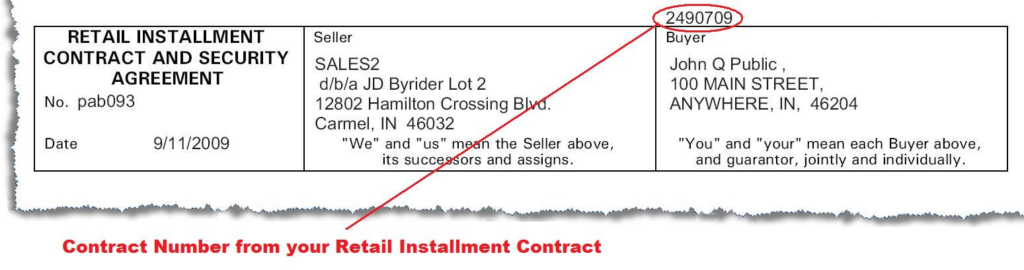
First-time users will need their contract number (found on your monthly statement or loan documents).
Pay by Phone
Call your local CNAC representative or the main customer service line for payment assistance.
General toll-free support: 888-240-3595 or 888-240-3575.
Hours are typically Monday–Friday during business hours (collection calls may occur up to 9:00 p.m. local time).
Payment Address (Mail)
Mail checks or money orders to the remittance address printed on your monthly CNAC statement. Include your contract/account number for proper crediting.
In-Person or Pay in Store
You can make payments in cash or by card at your local Byrider dealership (fees may apply).
CNAC also accepts payments via MoneyGram at participating locations.
No widespread third-party retail “pay in store” network is offered beyond authorized Byrider locations.
CNAC Mobile App & Payment Assistant
The MyByrider app is the recommended payment assistant. It lets you:
- Make secure payments anytime
- Set up recurring automatic payments
- View your balance and payment schedule
- Receive account notifications
The app is fully supported on both iOS and Android devices.
Fees and Late Payments
- Payment methods include electronic check (ACH), credit/debit card, cash (at dealership), check by mail, and MoneyGram.
- Credit/debit card payments may incur a convenience fee.
- Late payments can result in late fees, increased interest, negative credit reporting, or vehicle repossession.
- Contact CNAC promptly if you need a payment arrangement or are experiencing financial difficulty.
Contact CNAC
- Customer Service: 888-240-3595 or 888-240-3575
- Corporate Address: 12802 Hamilton Crossing Blvd., Carmel, IN 46032
- Email: [email protected] or [email protected]
- Official Website: cnac.com
- Payment Portal: payments.cnac.com
- MyByrider App: Download from App Store or Google Play
Have your contract number or account details ready when contacting support.
Frequently Asked Questions
How do I pay my CNAC bill online?
Visit payments.cnac.com or download the MyByrider app. You can make payments using your contract number.
What is the best way to pay my CNAC auto loan?
The MyByrider app is the easiest and most convenient method. It allows you to pay and manage your account directly from your phone.
Can I make a one-time payment without the app?
Yes. Use the online payment portal at payments.cnac.com with your contract number.
What is the phone number for CNAC customer service?
Call 888-240-3595 or 888-240-3575 for payment and account assistance.
How do I set up automatic payments with CNAC?
Use the MyByrider app or online portal to enroll in recurring payments from your bank account (ACH).
Where do I mail my CNAC payment?
Use the remittance address and coupon provided on your monthly statement.
What payment methods does CNAC accept?
CNAC accepts electronic check (ACH), credit/debit card, cash at Byrider dealerships, check by mail, and MoneyGram.
How do I avoid late fees on my CNAC account?
Make payments on time using the MyByrider app or online portal. Set up recurring payments for the most reliable option.
Information updated as of April 2026 from official CNAC and Byrider sources. Always verify the latest details directly on cnac.com or payments.cnac.com, as payment options and contact information may vary by account.