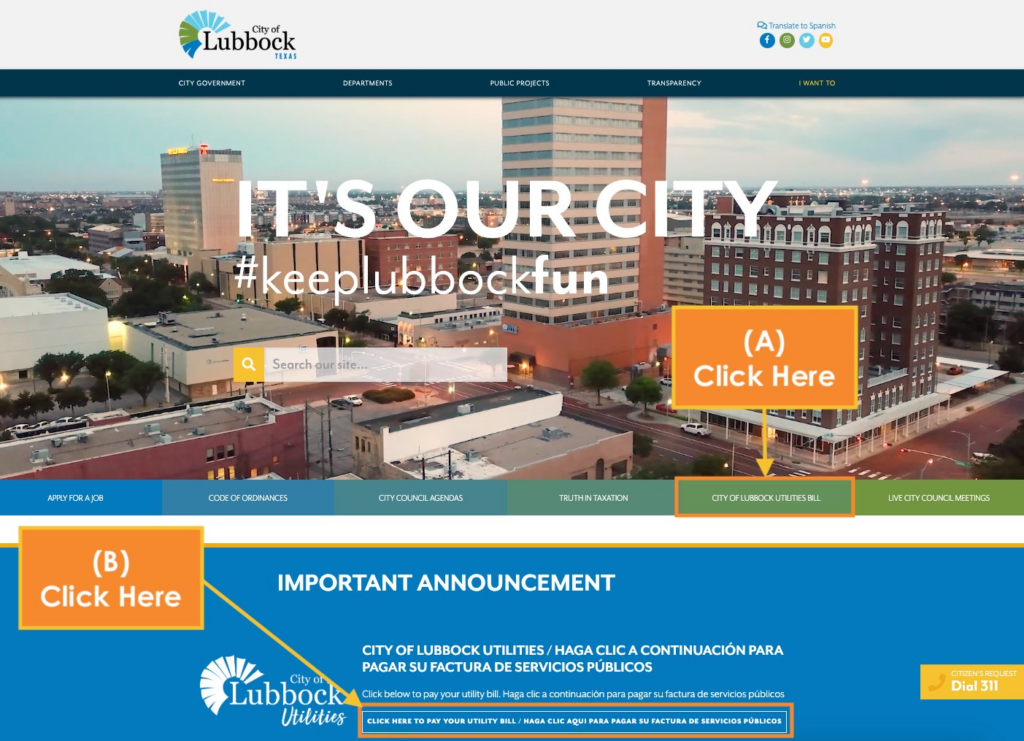
The City of Lubbock Utilities Department provides essential water, wastewater, sanitation, and related services to residential and commercial customers in Lubbock, Texas. Timely payment of your utility bill prevents late fees, service disconnection, reconnection charges, or liens on your property. As of April 2026, the City offers secure, convenient payment options through its official online portal and authorized channels.
Official City of Lubbock Utilities Payment Resources
- Pay My Bill Page – Official hub listing all payment methods, authorized centers, kiosks, Auto Pay setup, and customer service instructions.
- Online Payment Portal – Secure portal to sign in, create an account, make one-time payments, or manage your utilities bill 24/7.
Bank account (ACH/eCheck) and most electronic payments have no additional convenience fees unless processed at third-party retailers or kiosks. Payments are typically processed within two business days.
1. Guest Pay / One-Time Payment (No Full Account Required – Fastest for Quick Payments)
The official online payment portal supports one-time/guest payments without requiring full account registration.
How to pay as a guest:
- Visit the Online Payment Portal at https://paynow.mylubbock.us/LUBBOCK/.
- Select Make a One-Time Payment.
- Enter your account number (found on your utility statement) and verification details.
- Choose bank account (ACH/eCheck) or credit/debit card.
- Review and submit for immediate confirmation.
Payments post within two business days. This method is ideal for urgent or one-time payments when you do not have (or want) a full registered account.
2. Pay Online via Full Account (Recommended for Recurring Management)
Create or log in to your free City of Lubbock Utilities account for complete bill management.
How to pay:
- Go to the Online Payment Portal at https://paynow.mylubbock.us/LUBBOCK/ and sign in or create an account.
- View your current balance, usage history, and past bills.
- Select Make a Payment and pay with bank account or card.
- Enable paperless billing and manage preferences.
The portal also allows you to view detailed account information and track payments.
3. Set Up Auto Pay (Free Recurring Option)
Enroll in Auto Pay for automatic monthly deductions from your checking account.
- Log into your account in the portal and click Auto Pay, or call 806-775-2509.
- Auto Pay becomes effective on the next billing cycle.
- Current charges must be paid manually by the due date if enrolling mid-cycle.
This is the most convenient way to avoid missed payments.
4. Pay by Phone
Call 806-775-2509 (available during business hours) and follow the prompts to pay using bank information, debit, or credit card. Payments are processed within two business days. This line also handles service restoration after payment.
5. Pay by Mail
Mail a check or money order (payable to City of Lubbock Utilities) with no convenience fee.
Mailing address: City of Lubbock Utilities P.O. Box 10541 Lubbock, TX 79408-3541
Include the payment stub or clearly write your account number. Drop-box payments received after 4 p.m. are processed the next business day.
6. Pay In Person or at Kiosks
- 24/7 Outdoor Kiosk: Automated self-service kiosk at 1401 Avenue K – pay by cash, check, debit, or credit card 24 hours a day, 7 days a week.
- Indoor Pay Stations: Self-service kiosks in the lobby at 1401 Avenue K (Monday–Friday, 8:00 AM – 5:00 PM).
7. Authorized Payment Centers
Pay with cash, debit card, or money order at these participating locations (convenience fees may apply at some retailers):
- Check N Go locations (multiple addresses including 413 Frankford Ave., 4425 50th St., etc.)
- First Convenience Bank branches
- Food King stores
- Money Place, Pronto Check Cashing, United Supermarkets, and others (full list available on the Pay My Bill page).
8. Payment Assistance & Important 2026 Notes
If you are experiencing financial hardship, contact the Utilities Department to discuss payment arrangements or assistance programs. Payment assistance agencies are also available for eligible customers.
Important 2026 Notes:
- Always use official ci.lubbock.tx.us domains and the verified phone number above.
- The City never requests payment via gift cards, wire transfers, or unsolicited links.
- Late payments may result in service interruption after proper notice.
- For emergencies (water leaks, sewer issues), contact Public Works or the appropriate utility line.
Customer Service Contact
- Utilities Billing & Payments: 806-775-2509 (Monday–Friday, business hours)
- Location: 1401 Avenue K, Lubbock, TX
Frequently Asked Questions (FAQs)
1. What is the official online portal for City of Lubbock Utilities payments? Use the secure portal at https://paynow.mylubbock.us/LUBBOCK/ for one-time or account-based payments.
2. Is one-time/guest payment available without full registration? Yes – select “Make a One-Time Payment” in the portal.
3. Are there convenience fees for online payments? No fees are charged by the City for most electronic payments. Third-party retailers or kiosks may apply their own fees.
4. What phone number is used for payments? Call 806-775-2509 to pay by phone or set up Auto Pay.
5. Where do I mail my utility payment? City of Lubbock Utilities, P.O. Box 10541, Lubbock, TX 79408-3541.
6. How do I set up Auto Pay? Log into your account or call 806-775-2509.
7. Can I pay in cash 24/7? Yes – use the outdoor kiosk at 1401 Avenue K.
8. How quickly do online payments post? Payments are processed within two business days.
9. What services are included on my utility bill? Water, wastewater, sanitation, and related municipal services.
10. What should I do if I cannot pay my full bill? Contact 806-775-2509 immediately to discuss payment arrangements or assistance options.
11. Can I view my billing and usage history online? Yes – full access is available after signing into the payment portal.
12. Are third-party bill-pay services recommended? No. The City only endorses its official portal, phone, mail, kiosks, and authorized centers to avoid extra fees or delays.