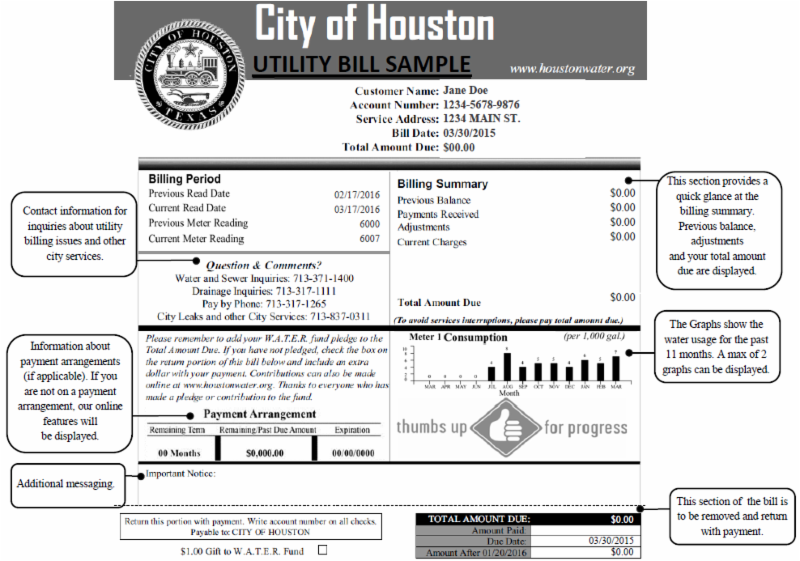
The City of Houston provides water and wastewater services to residents and businesses. Customers can manage and pay their water bills conveniently through the official online portal, which offers secure login access and payment options.
- To pay your Houston water bill or access your account, visit the official Houston Water Bills portal at https://www.houstonwaterbills.houstontx.gov/ProdDP/Default/Default.
- For additional information on customer account services and billing, go to the Houston Public Works Customer Account Services page at https://www.publicworks.houstontx.gov/customer-account.
One-Time and Guest Payment Options
The Houston Water Bills portal supports flexible payment methods, including options for one-time payments. Customers can often complete a payment by entering their account information without needing a full registered login in some cases. This guest-friendly approach is ideal for quick payments or if you are a new user.
The portal accepts major credit and debit cards as well as electronic checks. All transactions are processed securely through the City’s authorized payment system.
Login and Full Account Management
Registered users can log in to the Houston Water Bills portal to:
- View current and past bills
- Make one-time or recurring payments
- Enroll in paperless billing
- Monitor water usage and set consumption alerts
- Request bill adjustments or payment arrangements
- Access account transactions and history
To register or log in, visit the portal and follow the prompts. You will need your account number (found on your water bill) and other identifying information. Once registered, you can manage your account 24/7 from any device.
Pay by Phone
Houston Water customers can make payments over the phone through the City’s automated or customer service system. Call 311 (or 713-837-0311 from outside Houston city limits) for assistance with payments, billing questions, or account support.
Representatives can help with one-time payments, payment arrangements, and other inquiries during business hours. Automated options may be available for quick payments outside regular hours.
In-Person Payments and Service Centers
For in-person assistance with water billing, payments, new accounts, or service issues, visit Houston Public Works or designated customer service locations.
Main Customer Service Location Houston Permitting Center or Public Works offices Address: Check the official Houston Public Works website for current locations and hours, as service centers may vary.
Many routine payments and account services are now handled online or by phone to provide faster service. Call 311 to confirm the nearest location and current hours before visiting. Cash, checks, and cards are typically accepted at in-person counters.
Pay by Mail
Mail your payment with the remittance stub to the address printed on your water bill. If no specific P.O. Box is listed, you may send it to the City of Houston Water Billing address (verify current remittance address on your bill or through the portal to ensure timely processing).
Allow extra time for mail delivery. Do not send cash by mail.
AutoPay and Paperless Billing
Enroll in AutoPay through the Houston Water Bills portal to have your bill automatically paid from your bank account or card on the due date. This helps avoid late fees and ensures continuous service.
You can also switch to paperless billing in your account settings to receive statements and notifications by email instead of mail.
Customer Service Contact
General Inquiries and Payments: Call 311 (Houston residents) or 713-837-0311 (outside city limits) Email: [email protected] (for water billing questions) Online Support: Use the chat or help features in the Houston Water Bills portal
Representatives can assist with payments, account issues, starting or stopping service, and payment arrangements. For after-hours or urgent matters, use the portal or automated phone options when available.
Additional Notes
Houston Public Works encourages customers to use the official portal for the most up-to-date account information and to avoid scams. Always verify any unexpected calls or messages by contacting 311 directly.
The City offers resources for water conservation and usage monitoring through the portal to help customers manage and potentially lower their bills.
Frequently Asked Questions
How do I pay my Houston water bill online? Visit the official portal at https://www.houstonwaterbills.houstontx.gov/ProdDP/Default/Default. You can make one-time payments or register for full account access to manage recurring payments and view usage history.
Is there a guest or one-time payment option without logging in? Yes. The portal offers flexible one-time payment options. You can often pay by entering your account information without creating a full registered account.
What payment methods are accepted? The portal accepts major credit and debit cards as well as electronic checks. In-person payments at service centers typically accept cash, checks, and cards.
Can I set up automatic payments for my water bill? Yes. Enroll in AutoPay through the Houston Water Bills portal for automatic deductions from your bank account or card.
Where can I get help with my Houston water account or payments? Call 311 (or 713-837-0311) or email [email protected]. You can also use the support features in the online portal.
How do I start or stop water service in Houston? Contact Houston Public Works Water Billing through the portal, by calling 311, or by visiting a customer service location. Provide your address and account details for assistance.