The City of Florence Utilities Department provides water and sewer services to residential and commercial customers in Florence, South Carolina. Paying your Florence SC water bill on time prevents late fees, service disconnection, reconnection charges, or liens on your property.
Official Florence SC Water Bill Payment Resources
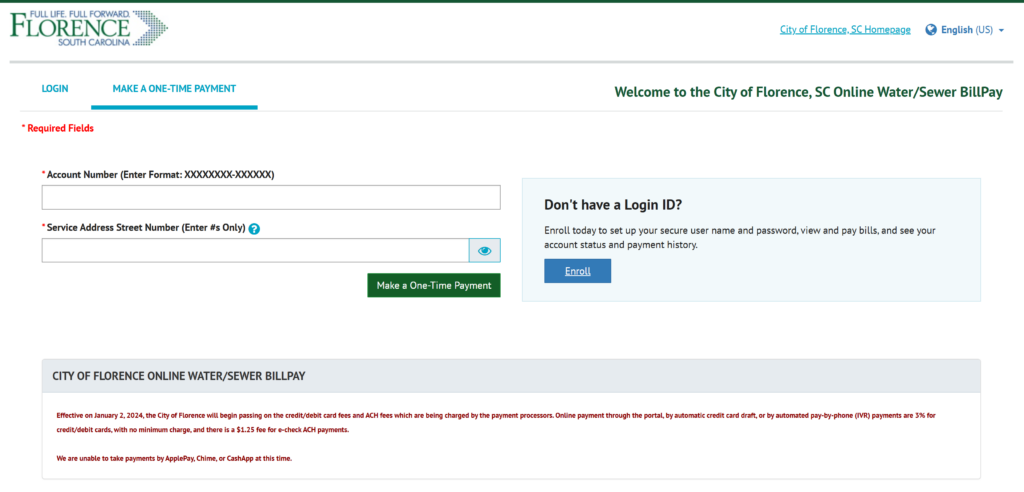
- Online Bill Pay Portal – Secure portal to make one-time payments (guest pay available) or recurring payments using your account number : https://billpay.onlinebiller.com/ebpp/florence/Login/Index
- Water Bill Payment Page – Official city page listing all payment methods, including online, bank draft, phone, mail, drop boxes, and customer service instructions.
Bank account (ACH/eCheck) payments have the lowest or no additional fee. Credit/debit card payments incur a convenience fee (typically passed on from the processor and disclosed at checkout). Payments are processed through the authorized online platform and usually post within 1–2 business days.
1. Guest Pay / One-Time Payment (Fastest for Quick Payments)
The official online bill pay portal supports guest/one-time payments without requiring a full registered account for every transaction.
How to pay as a guest:
- Visit the official portal at https://ubill.cityofflorencesc.gov/ (or directly via the Pay Online quick link on the city homepage).
- Select Make a One-Time Payment.
- Enter your account number (found on your monthly statement) and verification details.
- Choose bank account (ACH/eCheck) or credit/debit card.
- Review the convenience fee (if applicable) and submit for immediate confirmation.
This method is ideal for urgent or one-time payments when you do not have (or want) a full registered account.
2. Pay Online via Full Account (Recommended for Recurring Management)
Create or log in to your free account in the official portal for complete bill management.
How to pay:
- Go to https://ubill.cityofflorencesc.gov/ and sign in or register.
- View current balance, billing history, and usage details.
- Select Make a Payment and pay with bank account or card.
- Enable paperless billing and manage preferences.
The portal also supports multiple accounts and detailed transaction history.
3. Set Up Bank Draft / AutoPay
Enroll in Bank Draft (automatic monthly deduction from your checking account) by completing the online application form.
- Download or complete the form via the city website.
- Submit with a voided check by mail, email, or in person.
- Once approved, your bill is paid automatically on the due date with no additional fees.
This is the lowest-cost recurring option and eliminates missed payments.
4. Pay by Phone
Call 843-665-3155 and press Option 1 for payment assistance (available during business hours). Have your account number ready. Representatives can process payments with bank or card details.
5. Pay by Mail
Mail a check or money order (payable to City of Florence) with no convenience fee.
Mailing address: City of Florence P.O. Box 96881 Charlotte, NC 28296-0881
Or use the address on your statement or send to 324 West Evans Street, Florence, SC 29501. Include the payment stub or account number clearly. Allow 5–7 business days for processing. Never send cash.
6. Pay In Person or Drop Box
- In-Person Payments: Visit City Hall / Utility Finance at 324 West Evans Street, Florence, SC 29501 during business hours.
- After-Hours Drop Boxes: Located in the rear parking lot of the City Center for check or money order payments.
Payments made in person or via drop box are typically processed the next business day.
7. Payment Assistance & Important 2026 Notes
If you are experiencing financial hardship, contact Utility Finance immediately to discuss payment arrangements or extensions before your due date. The City offers case-by-case options to avoid disconnection.
Important 2026 Notes:
- Always use official cityofflorencesc.gov domains and the verified payment portal linked above.
- The City never requests payment via gift cards, wire transfers, cryptocurrency, Cash App, Chime, or Apple Pay.
- Late payments may result in service interruption after proper notice.
- For emergencies (water leaks, sewer issues), contact Public Works or the appropriate utility line.
Customer Service Contacts
- Utility Finance / Billing: 843-665-3155 (Monday–Friday, business hours)
- Email: [email protected]
- Physical address: 324 West Evans Street, Florence, SC 29501
Frequently Asked Questions (FAQs)
1. What is the official online portal to pay my Florence SC water bill? Use the authorized portal at https://ubill.cityofflorencesc.gov/.
2. Is guest/one-time payment available without full registration? Yes — select “Make a One-Time Payment” using your account number.
3. Are there convenience fees for online payments? Bank account payments have the lowest or no additional fee. Credit/debit card payments incur a convenience fee (disclosed at checkout).
4. What phone number is used for payments? Call 843-665-3155 and press Option 1.
5. Where do I mail my water bill payment? City of Florence, P.O. Box 96881, Charlotte, NC 28296-0881 (or use the address on your statement).
6. How do I set up Bank Draft / AutoPay? Complete and submit the online bank draft application with a voided check.
7. Can I pay in person or use a drop box? Yes — in-person at City Hall or use the after-hours drop boxes in the rear parking lot of the City Center.
8. How quickly do online payments post? Most electronic payments post within 1–2 business days.
9. What services are included on my Florence SC utility bill? Water and sewer services (garbage may be separate or through an HOA).
10. What should I do if I cannot pay my full bill? Contact Utility Finance at 843-665-3155 immediately to discuss payment arrangements.
11. Can I receive paperless billing? Yes — sign up through the online portal.
12. Are third-party bill-pay services recommended? No. The City only endorses its official portal, phone, mail, and in-person options to avoid extra fees or delays.