Huntington Bank offers secure Online Banking and Bill Pay services for personal and business customers. Once enrolled in Online Banking (requires a Huntington checking account), you can pay bills electronically, set up recurring or one-time payments, view statements, and manage your finances from anywhere. Huntington Bill Pay is free for standard electronic payments.
Quick Pay Links:
How to Pay Bills with Huntington Bank
Login to Online Banking (Recommended)
- Visit the login portal: https://onlinebanking.huntington.com/
- Sign in with your username and password.
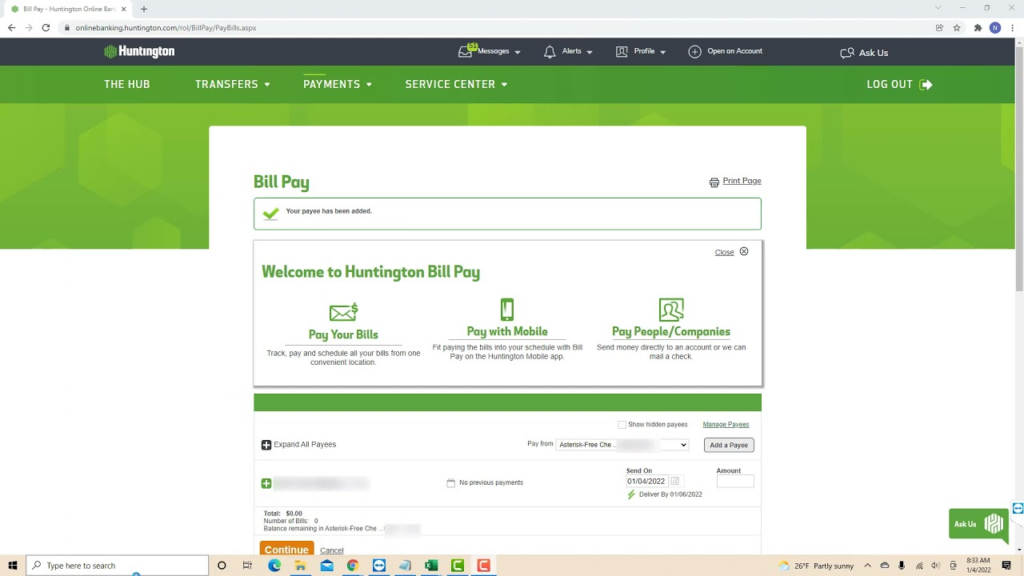
- Go to the Bill Pay or Payments tab.
- Add payees (companies or individuals), then schedule one-time or recurring payments.
New users can enroll directly on the Huntington website if you have a checking account.
Guest Pay / One-Time Payment
There is no true anonymous guest pay for general Huntington Bill Pay. Payments require an active Huntington checking account and Online Banking access. For specific loan or credit card payments, limited one-time options may be available by logging into your account or through third-party services like doxo (with possible convenience fees).
Pay by Phone
Call 800-480-2265 (daily 7:00 a.m. – 8:00 p.m. ET). Automated account information is available 24/7. Representatives can assist with bill pay setup, payments, and account questions.
In-Person / Pay in Store
Visit a local Huntington Bank branch to make payments or get assistance. Use the Branch Locator to find hours and services near you. Cash, check, or other in-branch payments may be accepted depending on the account type.
Mailing Address for loan or specific payments: Use the remittance address on your statement (e.g., for auto loans: PO Box 182519, Columbus, OH 43218).
Mobile App
Download the Huntington Mobile Banking App (available for iOS and Android). Features include: check balances, pay bills, transfer funds, deposit checks, and manage Bill Pay on the go. The app provides convenient access to the same Bill Pay tools as the desktop portal.
Payment Methods and Fees
- Huntington Bill Pay: Free for electronic payments to most payees (checks or electronic).
- One-time and recurring payments supported (one-time up to 1 year in advance; recurring for several years).
- Zelle® available for fast person-to-person payments via email or phone number.
- Convenience fees may apply if using third-party services (e.g., doxo) for certain payments.
Late Payments: Huntington does not charge late fees for standard Bill Pay if scheduled properly. However, late fees from the biller (utility, credit card, etc.) may still apply. Use the Look Ahead Calendar tool to track upcoming payments.
Contact Information
- Customer Service: 800-480-2265 (daily 7:00 a.m. – 8:00 p.m. ET)
- 24/7 Automated Info: Available via the same number
- Identity Theft / Fraud: 800-480-2265
- Mailing Address (General): Huntington Customer Service Center, EA5C42, P.O. Box 1558, Columbus, OH 43216
- Headquarters: 41 S High St, Columbus, OH 43215
Additional Features
- Caregiver Banking: Limited access for trusted family members to help manage bills.
- Paperless Statements: Enroll to receive statements electronically.
- Huntington Personal Online Guarantee: Protection for unauthorized Bill Pay transactions when reported promptly.
FAQs
How do I pay bills with Huntington Bank?
Log into Online Banking at onlinebanking.huntington.com, go to the Bill Pay tab, add payees, and schedule one-time or recurring payments. It’s free for most electronic payments.
Is there a guest pay option for Huntington bills?
No general guest pay is available. You need a Huntington checking account and Online Banking access. Limited one-time loan payments may be possible after login.
What payment methods are accepted in Bill Pay?
Electronic payments or checks sent by Huntington. Zelle® is available for person-to-person transfers. Third-party options like doxo may allow credit/debit card payments with fees.
Can I pay Huntington bills by phone?
Yes. Call 800-480-2265 for assistance with bill pay setup and account management during business hours.
Where can I pay in person?
Visit any Huntington Bank branch. Use the branch locator on huntington.com to find the nearest location and hours.
Is there a mobile app for Huntington bill pay?
Yes. The Huntington Mobile Banking App lets you pay bills, check balances, and manage payments from your phone.
How can I avoid late fees?
Schedule payments in advance through Bill Pay, use recurring payments, and monitor the Look Ahead Calendar tool in Online Banking.
Tip: Enroll in Online Banking and set up Auto Pay or recurring bill payments to save time and avoid missed due dates. Always use the official Huntington website or app for secure access. For the most current features, fees, or assistance, visit huntington.com or call 800-480-2265.