Chariot Energy is a Texas-based electricity provider offering 100% renewable energy plans. Making your Chariot Energy bill pay online is fast and secure through their My Account portal, with both guest/one-time payment options and full account management available.
Log in or QuickPay your Chariot Energy bill : https://mychariotenergy.myaccount.energy/sigma/myeaccount/?connectName=Sigma174PG
Chariot Energy billing help & FAQ : https://chariotenergy.com/chariot-energy-bill/
Online Bill Pay & New Portal
Chariot has moved customers to a new online customer portal.
- Access it via the “Manage My Chariot Energy Account / Pay My Bill” link or directly at the portal URL above.
- You’ll have a new account number (sent by email) and must reset your password the first time you use the new portal.
- Once logged in you can:
- View current balance and past statements
- Make one‑time payments
- Manage Auto‑Pay and bill‑delivery preferences (paperless/email)
Quick Pay / one‑time payment
Plan‑comparison sites note that Chariot also offers QuickPay, where you just need your account number and email address to make a one‑time online payment without fully signing into the portal.
If the portal is under maintenance, Chariot posts a Payment Portal Maintenance notice and asks customers to try again later or use phone/mail as backups.
Pay by Phone
You can pay and manage your account by phone.
- Main billing & customer service number: 855‑524‑2746 (1‑855‑5CHARIOT).
- Use this number to:
- Make a bill payment over the phone
- Get help with portal access, password reset, or new account number
- Ask about payment options, Auto‑Pay, or bill issues
Chariot warns that reps will never come to your home to collect payment or demand payment info by email; if you’re unsure about a contact, hang up and call 855‑524‑2746 yourself.
Mail & Other Options
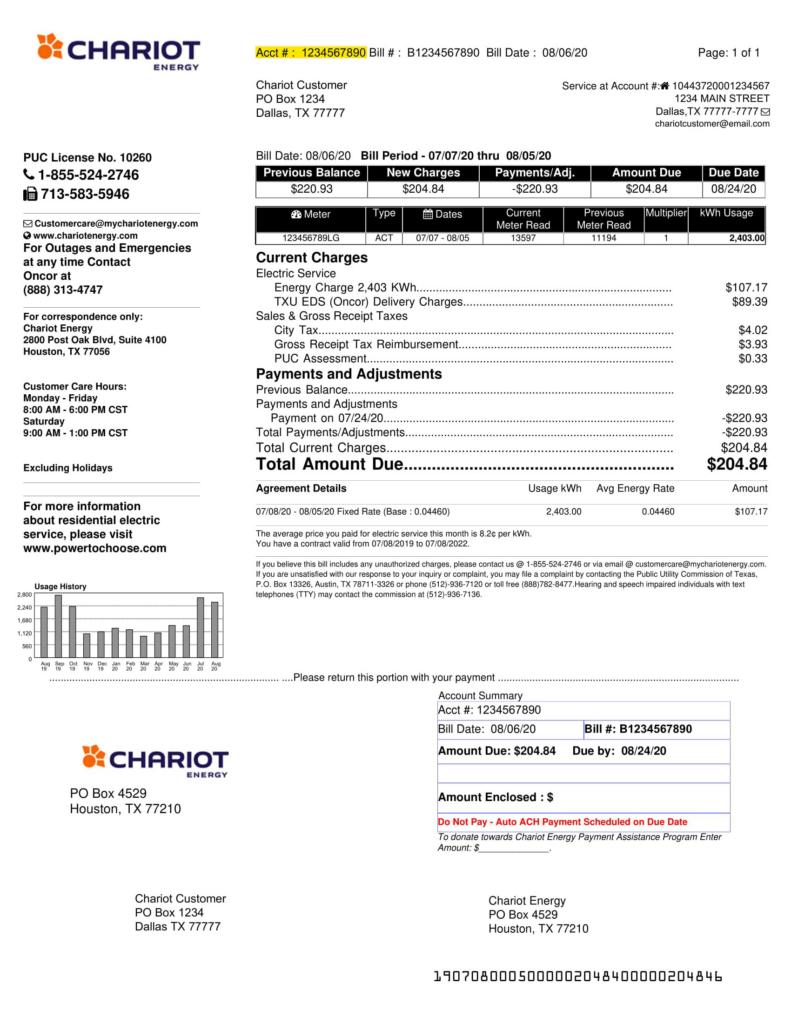
- Your paper bill shows the exact remittance address where you can mail a check or money order; always include your Chariot account number and mail early enough to arrive before the due date.
- Third‑party bill‑pay apps like doxo can pay Chariot Energy using bank account, card, or Apple Pay, but they are unaffiliated with Chariot and may charge extra fees or add delay, so they’re best used only if you already rely on them for multi‑biller management.
Auto‑Pay, Paperless & “Payment Assistant” Features
- Your Auto‑Pay enrollment stays active through the billing‑system upgrade; you shouldn’t need to re‑enroll, but you may need to re‑add saved payment methods in the new portal.
- You can switch to email bill delivery under Billing & Payments → Bill Delivery Preferences in the portal.
- The online dashboard lets you monitor usage and manage your account in one place, acting like a payment assistant to avoid missed due dates.
Chariot Energy Bill Pay FAQs
How do I pay my Chariot Energy bill online?
Use the new My Account portal (link above), enter your new account number, reset your password if prompted, then make a one‑time or Auto‑Pay bank/card payment and manage your bills in the dashboard.
Does Chariot Energy have a QuickPay option?
Yes. Chariot offers QuickPay, where you can make a one‑time payment using just your account number and email address, without fully logging in to the portal.
What phone number do I call to pay or fix a billing issue?
Call 855‑524‑2746 for all billing and account questions, including making a payment by phone, help with portal access, or concerns about possible scams.
Do I need to change my Auto‑Pay or billing preferences with the new portal?
No. Chariot says Auto‑Pay enrollment and billing preferences carry over, but you may need to re‑add saved payment methods after you first log into the new portal.
Can I still access the old Chariot Energy portal?
Only temporarily. The old portal stays available until April 30, 2026, and requires your old account number and password; going forward you should use the new portal with your new account number.