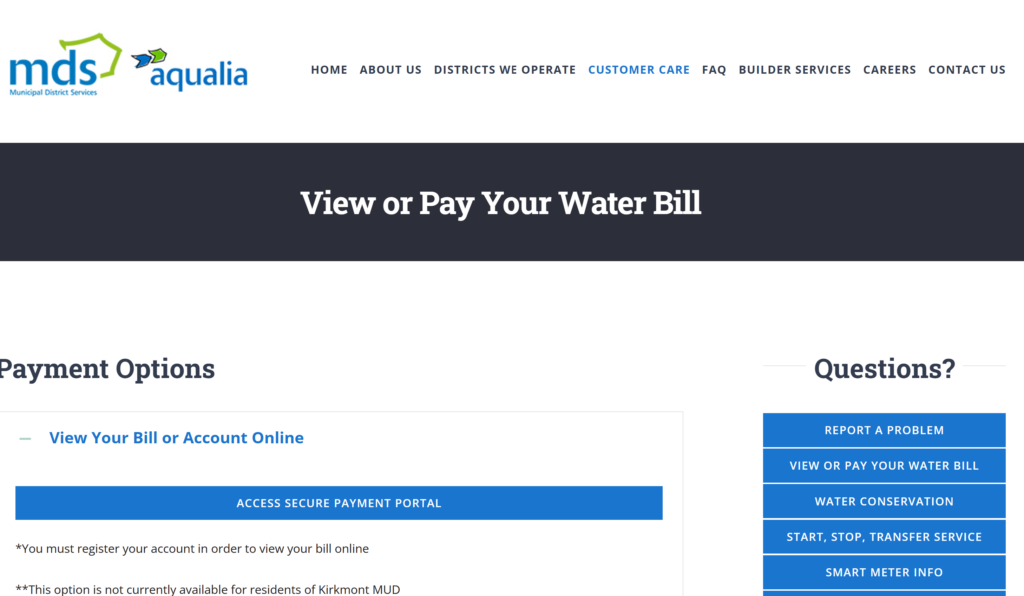
If you live in Bissonnet Municipal Utility District (MUD), your water and sewer billing is handled by Municipal District Services (MDS), which offers several ways to pay—online, by phone, through your bank, at local supermarkets, by mail, or in person at MDS offices. Knowing which option to use (and what each one costs) helps you avoid surprises and restore service quickly if you’re behind.
Online Payments Through the MDS Secure Portal
The easiest way to handle a Bissonnet MUD pay bill task is through the MDS Secure Payment Portal.
- Where to pay online:
- Go to the MDS View or Pay Your Water Bill page, then select Bissonnet MUD or use the link provided on your bill.
- Register or pay as guest:
- You can register your account to see your bill details, set up auto drafts, and store payment methods, or choose Pay as a Guest for a one‑time payment.
- Payment methods online:
Online fees and limits
MDS uses a third‑party processor that charges convenience fees on each electronic transaction:
- Credit/debit card (online):
- $3.50 per transaction for payments up to $500
- $5.95 per transaction for payments over $500 up to $5,000
- eCheck/ACH:
- $3.50 per transaction
You can also use the portal to set up monthly auto drafts, which still carry the third‑party fee but remove the risk of missing a due date.
Paying Your Bissonnet MUD Bill by Phone
If you prefer paying through a live person, you can make a phone payment with a representative.
- Live agent payments:
- Call (855) 270‑3592, or use the Pay‑by‑phone number printed on your bill.
- Payment types by phone:
- Credit/debit cards
- eCheck/ACH
Phone payment fees
Phone payments use the same processor and fee structure as online payments for most MDS‑served districts:
- Credit/debit card (live agent):
- $3.50 per transaction up to a specific threshold (often around $300–$500 depending on district)
- 2.65% or a higher flat fee for larger card payments, similar to other MDS‑managed districts
- eCheck:
- $3.50 per transaction
Phone payments are helpful if you’re not comfortable paying online, need confirmation from a person, or are dealing with a past‑due or terminated account and want to confirm what you owe today.
Paying Through Your Bank’s Online Bill Pay
You can also pay Bissonnet MUD using your own bank’s online bill pay feature.
- Set up the payee:
- Include your account number:
- Enter your water account number so MDS can apply your payment correctly.
- Use the remittance address:
- For mailed bill‑pay checks, use the standard MDS remittance address:
Bissonnet MUD
P.O. Box 3150
Houston, TX 77253‑3150
- For mailed bill‑pay checks, use the standard MDS remittance address:
Your bank may offer this service for free or with its own fee, but Consumers generally like bank bill pay because it avoids card fees and can be automated on a schedule you choose.
Pay at H‑E‑B, Kroger, or Walmart
If you prefer paying in person with cash, Bissonnet MUD payments are accepted at certain grocery stores.
- Local supermarkets:
- Walmart payments:
These in‑person options are useful if you primarily use cash or want to combine bill paying with a routine shopping trip, but remember to factor in the small service fee and delivery time.
Paying by Mail or In Person at MDS Offices
Mail‑in payments
You can always mail a check or money order for your Bissonnet MUD bill.
- Mailing address:
- Use the remittance address listed on your bill, which for Bissonnet MUD is typically:
Bissonnet MUD
P.O. Box 3150
Houston, TX 77253‑3150
- Use the remittance address listed on your bill, which for Bissonnet MUD is typically:
- What to include:
- Your payment coupon
- Your account number written on the check or money order
Mail delivery and processing take time, so MDS recommends sending your payment well before the due date (usually the 5th of each month).
Pay in person at MDS offices
MDS also accepts in‑person payments at designated office locations.
- Office hours:
- Typically Monday–Friday, 8:30 a.m. – 4:30 p.m.
- Payment types:
Office locations and directions are listed on MDS websites and in Bissonnet MUD welcome materials.
What to Do If Your Service Is Terminated for Non‑Payment
If your Bissonnet MUD water service has been TURNED OFF for non‑payment, the rules are stricter.
According to MDS:
- Accepted payment methods to restore service:
- Credit/debit card online through the secure portal
- Cashier’s check or money order in person at the nearest MDS office
- Cash at a grocery store or Walmart with your payment coupon
- After you pay:
- You must call Customer Care at (281) 290‑6507 with your payment confirmation number so they can schedule your water service to be restored.
Restoration is usually done the same day or next business day depending on when payment is confirmed, but calling in your confirmation is critical—simply paying is not enough to automatically turn the water back on.
Important Contacts for Bissonnet MUD Billing and Service
For questions about your Bissonnet MUD pay bill options or service:
- Billing & customer service:
- (281) 290‑6507 or (281) 290‑6500 for account and billing questions.
- 24/7 emergencies (leaks, sewer backups):
- (281) 290‑6500 is listed as the main MDS emergency line for water and sewer issues.
- Email support:
- [email protected] for general MDS questions, including billing.
- District website:
- Visit BissonnetMUD.org for links to “Pay Your Water Bill,” setup/cancel service, trash info, and consultant contacts.
FAQs
How can I pay my Bissonnet MUD water bill online?
You can pay online through the MDS Secure Payment Portal, where you can register your account or pay as a guest using a credit/debit card or eCheck/ACH. Card payments are generally $3.50 per transaction up to $500, $5.95 over $500, and eCheck payments carry a $3.50 fee.
Can I pay my Bissonnet MUD bill at the grocery store?
Yes. You can pay at local HEB and Kroger by presenting a payment coupon with your account number; a $1.50 fee is typically charged for this service. You can also pay at Walmart, where fees are usually $1.00 for 3‑day delivery or $1.50 for overnight delivery of your payment to MDS.
What happens if my Bissonnet MUD water service is shut off for non‑payment?
If your service is terminated for non‑payment, you must pay using credit/debit card online, at an MDS office with a cashier’s check or money order, or with cash at a grocery store or Walmart. After paying, call (281) 290‑6507 with your confirmation number so MDS can schedule your water service to be restored.
Is there a way to avoid convenience fees when paying my Bissonnet MUD bill?
Most electronic and retail options include a small third‑party fee, such as $3.50 for eCheck or card payments and $1.00–$1.50 for supermarket payments. To minimize fees, you can mail a check or money order directly to the P.O. Box listed on your bill or use your bank’s online bill pay service, which often does not add extra charges beyond any standard bank fees.
Who do I contact if I have questions about my Bissonnet MUD bill?
For billing questions, call (281) 290‑6507 or (281) 290‑6500, which connect you to Municipal District Services, the operator for Bissonnet MUD. You can also visit BissonnetMUD.org and MDSWater.com for links to pay your bill, set up service, or get more information about your water and sewer account.