Pay your Barberton, OH utility bill online, by phone, or in person using the City of Barberton utilities bill pay portal and customer service options.
Pay your Barberton utility bill online (official portal)
View or pay your City of Barberton utility bill (InvoiceCloud)
Online Bill Pay & New Portal
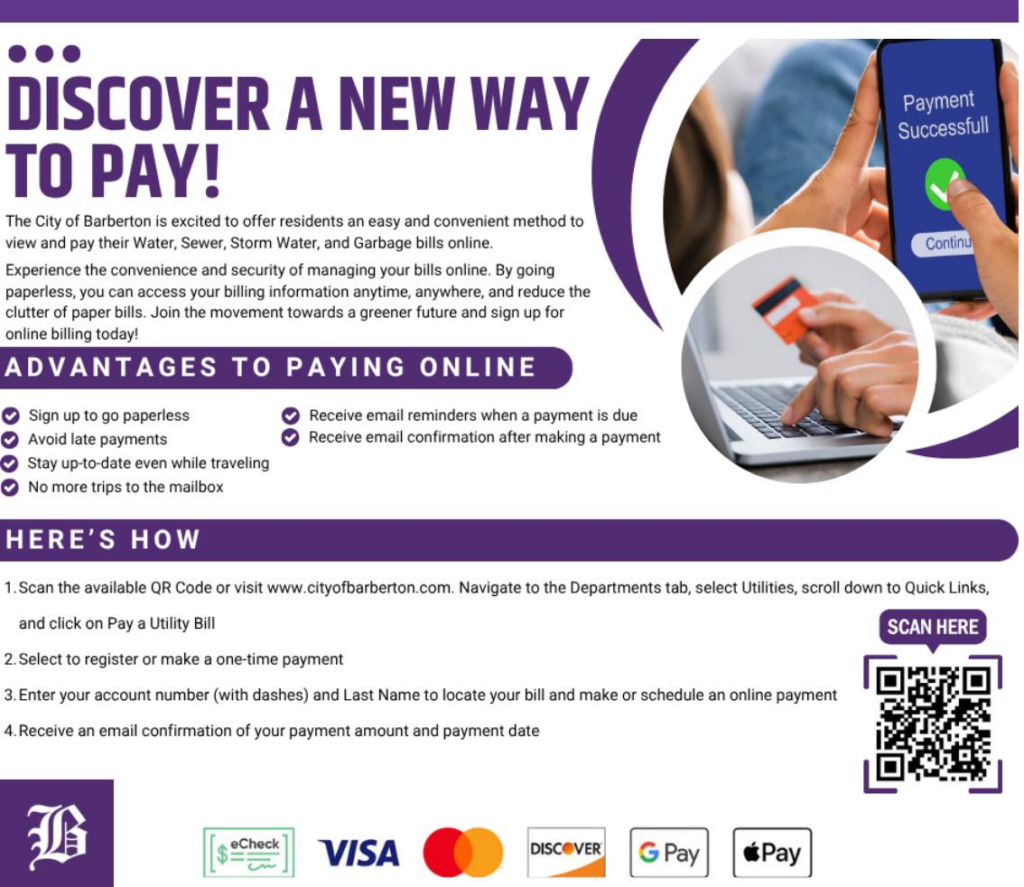
The City of Barberton uses an online Utilities Bill Pay portal (powered by InvoiceCloud) where you can view and pay your water, sewer, storm water, and garbage bills. With this site, you can sign up for email notifications, paperless billing, pay‑by‑text, schedule payments, set up recurring payments, and enroll in AutoPay using a credit card or checking account.
Guest Pay / One‑Time Payment (No Login)
You do not have to register to make a payment: the system supports One Time Payments where you pay without creating an account.
- One‑time (guest) payments require you to enter your payment information each time you pay.
- You can pay by credit card, debit card, or electronic check from your bank account.
- One‑time payments can be used for both current and past‑due Barberton utility bills.
Login to Pay & Manage Your Account
Registration is optional but recommended if you want more control over your Barberton utilities account.
- After registration, you can view past bills, search payment history, set up Auto‑Pay, and schedule future payments on specific dates.
- You can access the portal directly from the City of Barberton website via the “View or Pay your City of Barberton Utility Bill” button.
Pay by Phone & Contact Numbers
For utilities online bill access issues, the Utilities Online Bill Pay Help Desk is available by phone at 330‑861‑7143.
- For all other Barberton Utilities customer service issues, including billing questions and payment assistance, call 330‑753‑0328.
- These numbers are for support and billing questions; the city does not advertise a separate automated “pay‑by‑phone” payment line in the current public information.
If you forgot your balance, you can access your bill via the online portal or by contacting the Utilities Customer Service office.
In‑Person & Pay In Store Options
You can pay your Barberton utility bill in person at the Utilities Department office.
- Office / payment address:
Utilities Department
576 W Park Avenue, Room 105
Barberton, OH 44203 - Customer Service phone: 330‑753‑0328
- Office hours: Monday – Friday, 8 a.m. – 4 p.m.
The city does not list separate “pay in store” retail partners (like grocery or drug stores) for utility payments; payments are handled through the city portal, mail, or in‑office payments.
Mobile App & Third‑Party Bill Pay
The City of Barberton does not list its own dedicated utility mobile app for bill pay. However, you can pay Barberton utility bills through third‑party all‑in‑one bill pay services like doxo, which offer iPhone and Android apps.
- With doxo, you can pay your City of Barberton bills using credit card, debit card, Apple Pay, or bank account from mobile devices.
- These third‑party services may charge their own convenience fees separate from the City of Barberton.
Fees, Late Fees & AutoPay
There are no fees to use the official City of Barberton utilities bill pay website for online payments, AutoPay, or scheduled payments.
- You can pay online 24/7 and are encouraged to pay or schedule payments a few days before the due date to allow for processing.
- If you opt into Auto‑Pay, your bill will be automatically paid in full at 2 a.m. on the due date from your default credit card or bank account, helping you avoid late fees.
- If you are charged a late fee and believe it is in error, the city advises contacting the Utilities Customer Service office for more information about late fee charges.
Third‑party payment platforms (like doxo) may apply their own service charges that are not controlled by the City of Barberton.
Payment Assistance
The Utilities Department handles water and sewage services for thousands of residential and commercial customers in and around Barberton.
- For questions about payment arrangements, possible assistance options, or billing concerns, contact Utilities Customer Service at 330‑753‑0328.
- Neighboring communities such as Norton also direct their residents with Barberton‑managed water/sewer services to the same customer service number for billing questions.
FAQs About Barberton Utility Bill Pay
How do I pay my Barberton utility bill online?
Go to the City of Barberton Utilities Bill Pay portal from the city website and click on “View or Pay your City of Barberton Utility Bill” to access the InvoiceCloud payment site. You can then locate your account using the account number (with dashes) and pay by credit/debit card or electronic check.
Can I pay my Barberton utility bill without registering an account?
Yes, you can make a One Time Payment (guest‑style payment) without registering; registration is only required if you want to receive e‑bills and save your payment methods. One‑time payments require you to enter your payment details each time and can be used for current and past‑due bills.
Is there a fee to use the City of Barberton online bill pay?
No, the City of Barberton states there are no fees to use any services provided by the official utilities bill pay website, including AutoPay and scheduled payments. Fees may apply only if you choose to pay through outside third‑party services.
Who do I call if I have problems with my Barberton utility bill or online access?
For Utilities Online Bill Access issues, call the Online Bill Pay Help Desk at 330‑861‑7143. For all other utilities customer service questions, including billing and late fees, call 330‑753‑0328 or visit the Utilities Department at 576 W Park Avenue, Room 105, Barberton, OH 44203.
How can I avoid late fees on my Barberton utility bill?
Enroll in Auto‑Pay through the online portal so your balance is paid automatically in full at 2 a.m. on the due date using your saved payment method. You can also schedule payments a few days before the due date to allow processing time and reduce the chance of late fees.