Pay your Lincare bill online through the Patient Portal (with or without login), by phone with the billing team, by mail, or via third‑party apps like doxo.
Lincare Patient Portal – view & pay bills online
Lincare billing FAQs & support contact
Online Bill Pay & Patient Portal
Lincare’s Patient Portal is the main way to view and pay bills, update insurance, and manage your account.
- Log in at portal.lincare.com to view current and past statements, see Total Insurance Pending and Customer Amount Due, and pay securely with major cards.
- The portal supports paperless billing, auto‑pay/recurring payments, supply reorders, and secure messaging with support.
Guest Pay / Pay as Guest
Lincare promotes “hassle‑free billing” and easy bill payment through the portal, but current public info emphasizes portal registration rather than a separate public “guest pay” URL.
- Patients can still pay without deep account management by registering quickly using information from a recent bill and then using the portal for one‑time payments.
- If you do not want to use the portal, you can pay by phone or by mail using the info on your statement.
Registering for the Portal
To register, you need a recent Lincare billing statement.
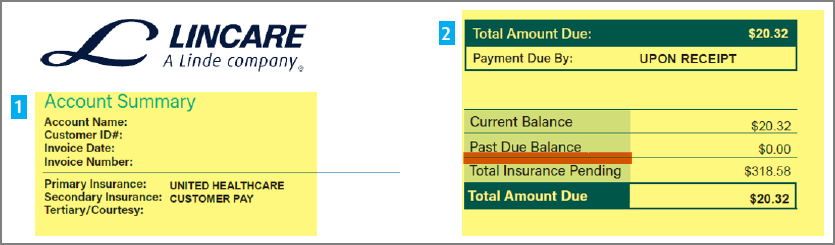
- Find your Customer ID number on the upper part of your bill.
- Go to the Patient Portal registration page, enter your name, date of birth, and Customer ID, then complete multi‑factor verification using the phone or email Lincare has on file.
Pay by Phone
Lincare has a central billing phone line and local billing office numbers printed on each statement.
- Corporate billing team: 1‑800‑284‑2006, then press 4 for billing.
- doxo also lists 888‑239‑8105 as a customer‑support phone for billing questions.
You can call these numbers to:
- Make a payment by phone (card or other methods, as allowed).
- Ask about your balance, insurance status, or auto‑pay amounts.
- Request an itemized bill or help reading your statement.
Pay by Mail
You can pay by check or money order via mail.
- Use the remittance address printed on your current Lincare statement, as remit‑to addresses can differ by region or billing office.
- Include the detachable payment coupon, or clearly write your Customer ID on the check or money order so it is correctly applied.
Third‑Party Bill Pay (doxo)
Lincare bills can also be paid through doxo, an all‑in‑one bill‑pay service.
- doxo supports payments by linked bank account (often free), credit card, debit card, and Apple Pay, with iOS and Android apps available.
- You can track delivery and history of Lincare payments inside doxo; note that doxo is not affiliated with or endorsed by Lincare, and some payment methods may have fees.
Billing Questions, Insurance & Common Issues
Lincare’s official Billing FAQ covers common questions about statements and insurance.
- To see whether insurance has been billed, look at “Total Insurance Pending” on the right‑hand side of your invoice; the “Customer Amount Due” shows what Lincare expects you to pay based on deductible/coinsurance.
- If your account is on auto‑pay, you will still receive a statement so you can review charges; you can turn off paper statements from the Patient Portal profile settings or by calling the number on your bill.
- If equipment is returned after the bill date, you are still responsible for the full month’s rental charge for that billing cycle.
Lincare has faced federal settlements for overbilling Medicare for oxygen equipment beyond allowed rental periods, so patients who suspect improper billing should contact Lincare billing and, if needed, Medicare or a patient advocate.
Escalation & Patient Advocate Line
If your local billing office or corporate billing team cannot resolve an issue, Lincare provides a WeCare Patient Advocate line.
- WeCare Patient Advocate Line: 855‑937‑2238 (Mon–Fri, 8 a.m.–6 p.m. ET).
- This team helps with unresolved product, billing, and general disputes and can review complex cases such as repeated or old charges.
Lincare Bill Pay FAQs
How do I pay my Lincare bill online?
Use the Lincare Patient Portal at portal.lincare.com to access your billing history and securely pay with a major credit card, and manage paperless billing and auto‑pay settings.
What phone number do I call to pay my Lincare bill or ask billing questions?
Call Lincare’s corporate billing team at 1‑800‑284‑2006 and press 4, or use the local billing office number printed on your statement; doxo lists 888‑239‑8105 as an additional support number.
How can I tell if my insurance has been billed?
Look for “Total Insurance Pending” on the right‑hand side of your Lincare invoice to see the amount billed to insurance; your “Customer Amount Due” reflects the portion Lincare expects you to pay.
Why am I still getting a bill if I’m on auto‑pay?
Lincare continues sending statements (paper or paperless) so you can review charges and payments; you can switch to paperless billing via the Patient Portal or by calling the number on your statement.
I returned my equipment. Why am I still being billed?
If equipment was returned after your bill date, you are typically responsible for charges for that month’s billing period. If you think your bill is wrong, contact your local center or billing office to review service and return dates.