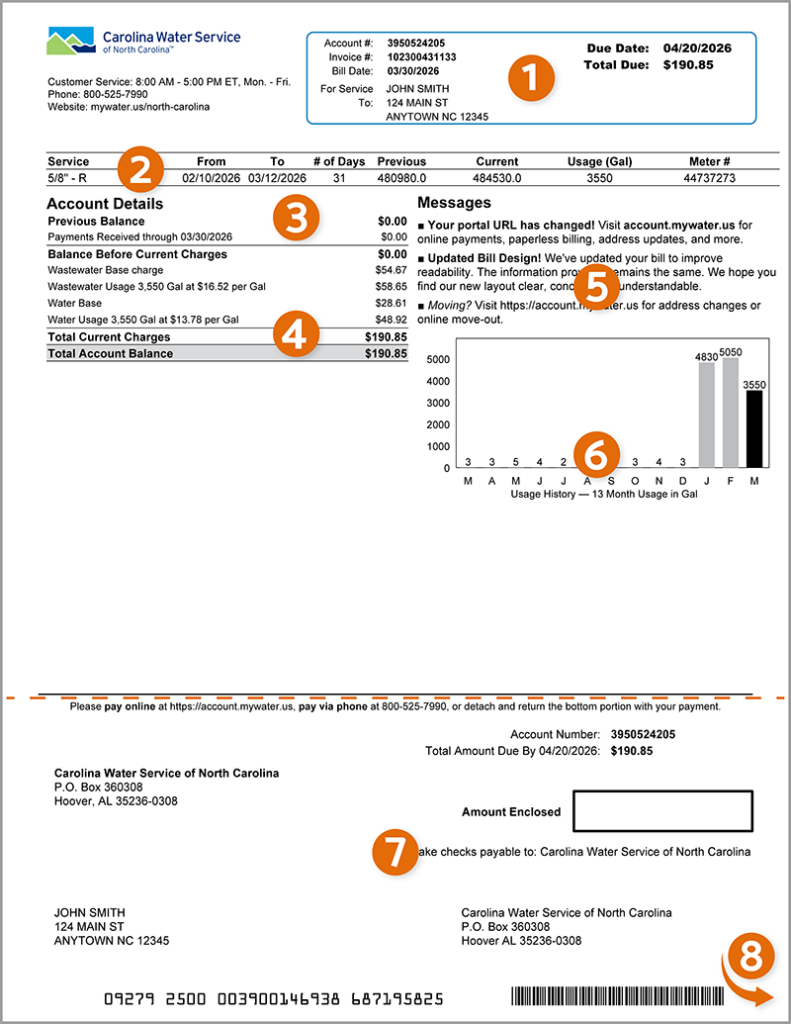
Carolina Water Service of North Carolina provides regulated water and wastewater (sewer) services to residential and commercial customers across 38 counties in North Carolina. As a subsidiary of Nexus Water Group (formerly part of Utilities, Inc.), the company emphasizes safe, reliable service and modern customer tools. Paying your bill on time prevents late fees, service disconnection, and reconnection charges.
A major customer-service upgrade launched on April 6, 2026, introduced the new My Account self-service portal, replacing earlier systems. The company explicitly states it is not affiliated with any third-party bill-payment services such as Doxo or Mint. Using unofficial platforms may result in extra fees, delayed posting, late charges, or service interruption. Always use the official channels listed below.
1. Pay Online via My Account Portal (Recommended & Fastest Method)
The official My Account portal is the primary, secure, and most convenient way to manage and pay your bill 24/7 from any computer or mobile device.
How to access and pay:
- Visit the My Account portal at: https://www.mywater.us/north-carolina/account-billing/my-account-portal
- New users: Click “Sign Up” and enter your 10-digit account number (found on every bill) and your 5-digit service address ZIP code.
- One-time/guest payments are available without full registration for quick payments.
- Supported payment methods include:
- Credit or debit cards (Visa, MasterCard, Discover, American Express)
- Digital wallets (Apple Pay, Google Pay, and others)
- Bank account (ACH/eCheck) – typically the lowest or no additional fee
Key features:
- View current and past bills
- Monitor usage history and compare with average households
- Set up AutoPay (bank draft) for automatic monthly payments
- Enable paperless billing (default for new accounts)
- Receive text/email alerts for due dates, outages, or low balances
- Start/stop/transfer service (48-hour notice required)
Payments made online usually post the same or next business day. This method is faster and more secure than any third-party processor.
2. Pay by Phone
For customers who prefer speaking with a representative or using an automated system:
Customer Service & Payments: (800) 525-7990
- Business hours: Monday–Friday, 8:00 AM – 5:00 PM Eastern Time
- Emergency line: Same number, available 24 hours a day, 365 days a year (for leaks, outages, or urgent billing issues)
Have your 10-digit account number ready. Representatives can process payments with credit/debit cards or bank information. This is the official phone channel—avoid any unsolicited calls claiming to be from Carolina Water Service.
3. Pay by Mail
Traditional mailed payments remain free of convenience fees when using a check or money order (cash is not accepted by mail).
Mailing address (Bill Payments Only): Carolina Water Service of NC PO Box 360308 Hoover, AL 35236-0308
Include the detachable payment coupon from your bill (or clearly write your 10-digit account number on the check). Allow 5–7 business days for postal delivery and posting. Do not send cash.
4. Pay In Person – NEW Cash Option at Local Stores
Carolina Water Service now offers a convenient cash payment option at hundreds of participating retail locations across its service area.
How it works:
- Log into My Account or contact customer service to generate a payment barcode.
- Take the barcode (or bill) to authorized retailers such as 7-Eleven, CVS, Walgreens, Food Lion, Walmart, and other participating stores.
- Pay with cash—no credit/debit card needed at the counter.
This new feature (highlighted in April 2026 updates) provides same-day or next-day posting for cash-paying customers who prefer not to use online or phone options. Convenience fees may apply at some retailers—confirm at the store.
5. Automatic Payment (AutoPay) & Paperless Billing
Enroll in AutoPay through My Account to have your bill automatically deducted from your bank account on the due date. This eliminates missed payments and late fees. New users receive paperless billing by default, with easy options to switch back to paper if preferred.
6. Bill Assistance & Financial Hardship Programs
If you are experiencing financial difficulty, Carolina Water Service participates in state and local assistance programs, including the Low Income Household Water Assistance Program (LIHWAP) where available. Contact customer service at (800) 525-7990 to discuss payment arrangements, extensions, or reconnection assistance. Additional resources may be available through local community action agencies.
7. Understanding Your Bill & 2026 Updates
Your monthly bill includes base charges, usage-based water and wastewater fees, and any applicable taxes or surcharges. The new My Account portal makes it easier to review itemized charges, payment history, and usage trends. Recent April 2026 system updates also improved alert notifications and service request processing.
Important Security Notes (2026):
- Never share account or payment information except through official channels.
- Beware of scams—legitimate representatives will never demand immediate payment via gift cards, wire transfers, or cryptocurrency.
- Report suspicious activity to customer service and local authorities.
Customer Service Contact Summary
- Phone: (800) 525-7990 (billing & emergencies)
- Online inquiries: Secure form via My Account or website contact page
- Mailing (payments only): PO Box 360308, Hoover, AL 35236-0308
Frequently Asked Questions (FAQs)
1. What is the official website and new portal for Carolina Water Service bill payments? The official site is https://www.mywater.us/north-carolina. All payments and account management now go through the new My Account portal launched in April 2026.
2. Is there a convenience fee for credit/debit card payments? Fees may apply for card and digital wallet payments (amount shown at checkout). Bank ACH payments usually have the lowest or no additional fee. The utility does not profit from these fees.
3. Can I pay my bill without creating a My Account profile? Yes—guest/one-time payment options are available directly through the portal for immediate needs.
4. What is the new cash payment option? Customers can now pay with cash at many major retailers (7-Eleven, CVS, Walmart, Food Lion, etc.) using a barcode generated in My Account or provided by customer service.
5. Has the mailing address changed? Yes. The current remittance address is Carolina Water Service of NC, PO Box 360308, Hoover, AL 35236-0308 (updated in 2026).
6. What is the correct customer service phone number? (800) 525-7990. This toll-free number handles billing inquiries, payments, and 24/7 emergencies (replaces the older 704 area code number).
7. How do I set up AutoPay? Log into My Account, go to payment settings, and enroll your bank account for automatic monthly deductions.
8. Are third-party services like Doxo recommended? No. Carolina Water Service explicitly states it is not affiliated with Doxo, Mint, or similar platforms. Using them may cause delays and extra fees.
9. How quickly do online payments post? Most electronic payments (My Account or phone) post within 1–2 business days. Cash retail payments usually post the same or next day.
10. What should I do if my service is disconnected? Pay the full past-due balance plus any reconnection fee immediately through an official channel, then call (800) 525-7990 to schedule reconnection (typically within 36 hours during business hours).
11. Can I view my usage history and set up alerts? Yes—My Account provides detailed usage reports, conservation tools, and customizable text/email alerts.
12. Where can I find my 10-digit account number? It appears on every bill, the My Account dashboard, and all official correspondence.
This guide is based exclusively on official Carolina Water Service resources (mywater.us) verified in April 2026 and is designed to help you pay quickly, securely, and at the lowest possible cost. For the absolute latest details or to make a payment, always go directly to the My Account portal or call the official customer service number. Bookmark https://www.mywater.us/north-carolina for future reference.
If you have a specific situation—such as financial hardship, new service setup, or a recent move—provide additional details for more tailored assistance. Paying through official channels ensures your payment is applied promptly and correctly.