Pay your City of Santa Fe utility bill (Water, Sewer, Trash) quickly and securely. Official methods with no hidden convenience fees on most payments.
- Pay Utility Bill Online – Official Portal (Paymentus – supports Guest Pay & registered accounts)
- Pay by Phone – Automated System – Call (505) 955-6100 (24/7 automated line)
How to Pay Your City of Santa Fe Utility Bill
The City of Santa Fe Utilities (Water, Sewer, and Solid Waste/Trash) offers several convenient ways to pay your bill, including online, phone, mail, and drop box options.
Online Bill Pay – Guest Pay or Login
Use the official Paymentus portal at santafenm.gov/paymentus to:
- Make a one-time guest payment (no account registration required)
- Log in to your account for recurring payments and Auto Pay setup
- View current balance and payment history
This is the fastest and most recommended method.
Pay by Phone
Call the automated payment line: (505) 955-6100
Available 24/7 for credit/debit card payments.
For customer service and billing questions:
Utility Customer Service: (505) 955-4333
Mailing Address
Send checks or money orders to:
City of Santa Fe Utility Billing
P.O. Box 909
Santa Fe, NM 87504-0909
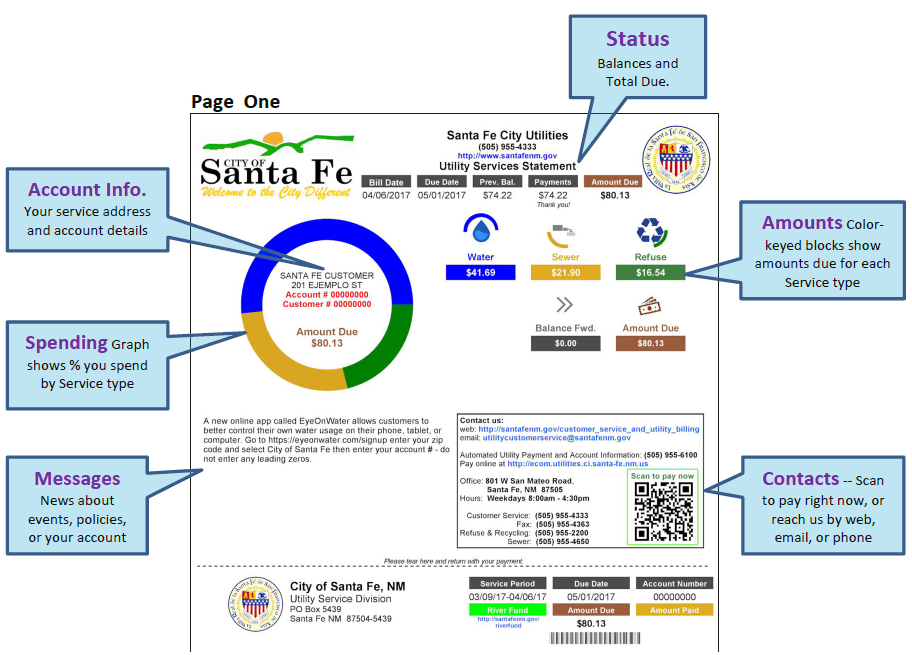
Include your payment stub or account number for faster processing.
In-Person & Drop Box
- Use the drop box located at the front door of the Water Division office:
801 W. San Mateo Rd, Santa Fe, NM 87505 - In-person payments are accepted during business hours at the Utility Billing Division (same address).
No widespread “pay in store” retail partners (like Walmart or 7-Eleven) are currently offered for Santa Fe Utilities.
Mobile App & Payment Assistant
The City of Santa Fe does not currently offer a dedicated mobile app for utility payments. All online payments are handled through the secure Paymentus portal, which works smoothly on mobile browsers. You can also set up Auto Pay (recurring payments) after registering your account in the portal.
Fees and Late Payments
- The City of Santa Fe does not charge convenience fees for most online or phone payments via their official portal and automated system.
- Bills are considered delinquent 15 days after the due date.
- Late payments may result in finance charges, collection actions, or a lien on your property.
- To avoid late fees, enroll in Auto Pay or pay early through the online portal or phone line.
Contact City of Santa Fe Utilities
- Utility Billing Customer Service: (505) 955-4333
- Automated Payment Line: (505) 955-6100
- Email: [email protected]
- Water Division Address: 801 W. San Mateo Rd, Santa Fe, NM 87505
- Official Website: santafenm.gov
Frequently Asked Questions
How do I pay my Santa Fe utility bill online?
Visit the official Paymentus portal at www.santafenm.gov/paymentus. You can pay as a guest or log in to your account. Credit/debit cards and e-check are accepted.
Can I make a guest payment for City of Santa Fe utilities?
Yes. The Paymentus portal allows one-time guest payments without creating an account.
What is the phone number to pay my Santa Fe water bill by phone?
Call the automated payment system at (505) 955-6100. It is available 24 hours a day, 7 days a week.
Where do I mail my City of Santa Fe utility payment?
Mail payments to: City of Santa Fe Utility Billing, P.O. Box 909, Santa Fe, NM 87504-0909.
How do I avoid late fees on my Santa Fe utility bill?
Pay your bill before the due date using online, phone, or drop box options. Enrolling in Auto Pay is the best way to prevent late fees and service interruption.
Is there a mobile app for Santa Fe Utilities bill pay?
There is no dedicated mobile app. Use the responsive Paymentus portal on your phone’s browser for full functionality.
When is my Santa Fe utility bill considered delinquent?
All charges become delinquent 15 calendar days after the due date shown on your bill.
How do I contact Santa Fe Utilities customer service?
Call (505) 955-4333 for billing questions or email [email protected]. Have your account number ready.
Information updated as of April 2026 from official City of Santa Fe sources. Always verify details directly on santafenm.gov for the latest updates.