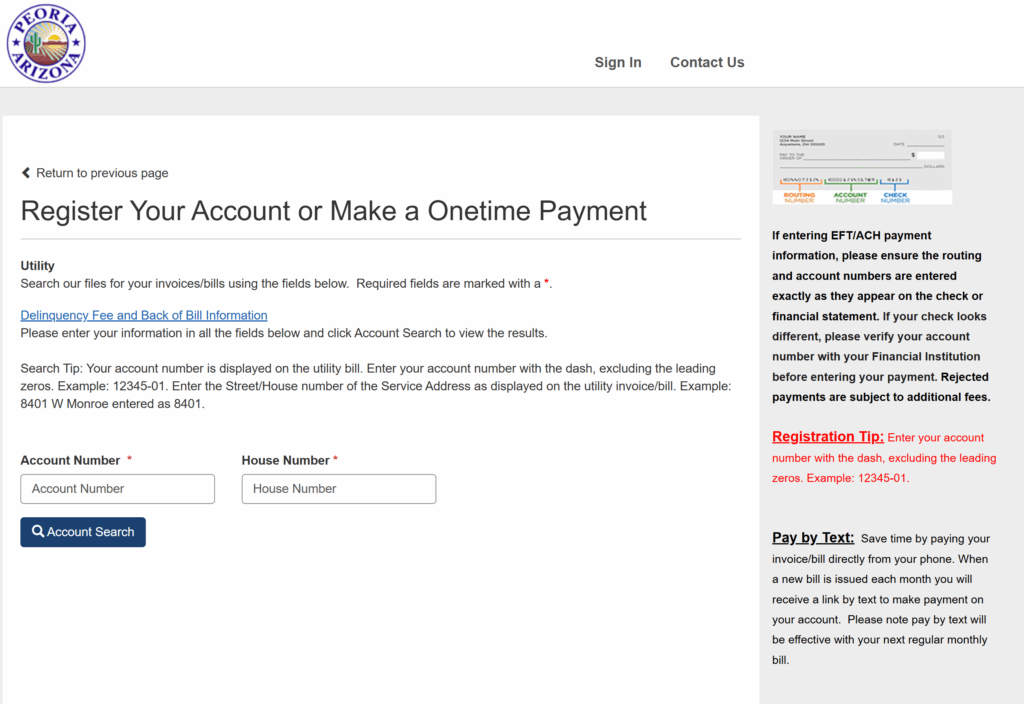
The City of Peoria, Arizona, provides water, wastewater, and solid waste utility services to over 190,000 residents. Customers can pay monthly utility bills securely online via the Invoice Cloud portal (launched June 2021), by phone at 623-773-7160, mail, in person, or through doxo, with AutoPay and paperless billing available to avoid late fees and track usage. Bills include water, sewer, and trash charges; new service requires an application and possible deposit. Average residential bills range from $40–$80, depending on usage.
Learn how to pay your City of Peoria water bill, set up auto payments, view statements, and contact support using the official links below.
Customer Service and Utilities | City of Peoria
Access billing info, pay your bill, start/stop service, and report issues. Dial 623-773-7160 for 24/7 automated payments.
Pay Utility Bill | City of Peoria
Pay online via Invoice Cloud, by phone, mail, or in person. View 24 months of invoice history and set up paperless billing.
Invoice Cloud Portal – Login & Guest Pay
https://www.invoicecloud.com/portal/peoriaaz (via peoriaaz.gov)
Log in or make guest payments to view balances, pay bills, and enroll in AutoPay. Use your account number.
Payment Options
1. Pay Online via Invoice Cloud Portal
- Website: Visit peoriaaz.gov/utility-bill and select “Pay Online” to access Invoice Cloud.
- Features:
- One-time or recurring payments; enroll in AutoPay for automatic deductions.
- View current/past bills (up to 24 months), payment history, and usage details.
- Secure 24/7 access with real-time confirmation and paperless billing.
- Payment Methods: Credit/debit card (Visa, MasterCard, Discover, American Express) or eCheck/ACH (bank account).
- Enrollment: Use your account number; no fees for ACH AutoPay.
- Note: Payments post immediately; track and manage all payments easily.
2. Pay By Phone
- Phone Number: Call 623-773-7160 (24/7 automated system).
- Accepted: Credit/debit card.
- Process: Follow prompts to enter account number and pay; instant confirmation.
3. Pay By Mail
- Mailing Address: City of Peoria PO Box 52155 Phoenix, AZ 85072-2155
- Instructions: Include payment stub with check or money order (no cash); write your account number on the check. Allow 7-10 days for processing.
4. Pay In Person
- Location: Customer Service Center, City Hall Complex, 8401 W. Monroe St., 2nd Floor, Peoria, AZ 85345.
- Accepted: Cash, check, money order, credit/debit card.
- Hours: Monday–Thursday, 7 a.m.–6 p.m. (closed Fridays).
- Note: Drop box available in front of the flag pole (north side circle drive); accepts checks/money orders only.
5. Payment via doxo
- doxo.com: Pay with credit/debit card, Apple Pay, or bank account. Free for bank transfers; fees may apply for cards.
Account & Billing Support
- Customer Service Phone: 623-773-7160 (billing, payments, service changes; Mon-Thu 7 a.m.–6 p.m. MST).
- Email: Use the contact form on peoriaaz.gov/customerservice.
- Address: 8401 W. Monroe St., Peoria, AZ 85345.
Assistance Programs
- AutoPay: Automatic deductions from bank or card; prevents late fees.
- Paperless Billing: Enroll via portal for digital statements and email alerts.
- Financial Hardship Donation: One-time donations to support residents; pay via portal.
- New Service: Apply online with ID and deposit; activation within 1-2 business days.
FAQs
How can I pay my water bill?
Use these helpful tips to ensure a smooth payment process:
- Please do not mail cash.
- We accept check, money order, or cashier’s check.
- Make checks payable to “City of Peoria.”
- Please do not staple or tape your check to the bottom portion of the bill.
- Write your City Services 10-digit account number on the check.
- Send the bottom portion of the bill.
How do I pay my water or sewer bill?
- Water service may be shut off due to non-payment.
- If your account is unpaid for 60 days after the Billing Date, your property could be posted with a Final Notice and Demand.
- Upon receiving the Final Notice and Demand, you have 15 days to bring your account current or your water may be shut off.
How to pay for my water bill?
Pay your bill online with a credit card or from your bank account. We offer two payment portal options:
- Standard Access – Use your utility account number or address to see your amount due and make a one-time payment. You do not need to be a registered user.
- Premium Access – Access more features and set up recurring automatic payments.
How to pay your water bill?
The online payment process is all done in three easy steps:
- Find account using name, address, or account number.
- Select the account and the amount you wish to pay.
- Make the payment.
Tips for Managing Your City of Peoria Water Bill
- Register for the Invoice Cloud portal to enable AutoPay and paperless billing—avoid late fees and track 24 months of history.
- Pay early to prevent shutoffs; use the drop box for secure after-hours deposits (checks only).
- Review usage monthly for conservation; contact 623-773-7160 for new service or issues.
- Save confirmations and monitor for rate changes; donate to hardship fund via portal if able.
- Use official channels only to avoid scams—no payments via unsolicited calls/texts.
City of Peoria offers easy water bill pay—access the portal at peoriaaz.gov for instant management!