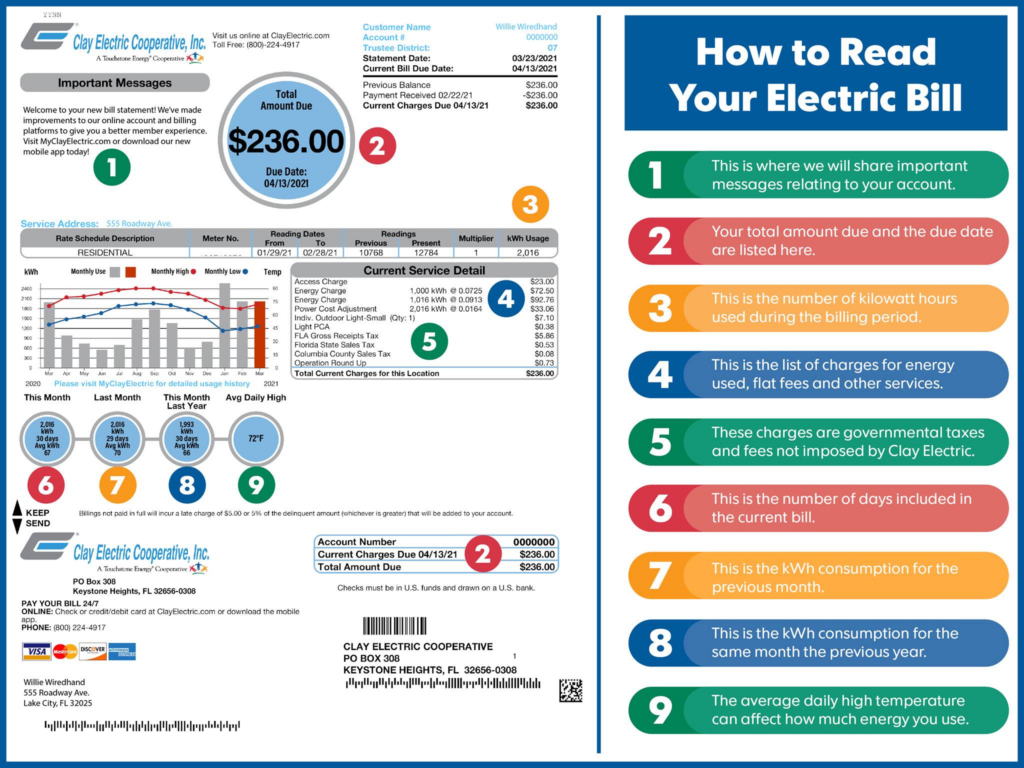
Clay Electric Cooperative, Inc. is one of the largest member-owned electric cooperatives in the United States, delivering reliable power to approximately 198,000 meters across 15 counties in Northeast and Central Florida. Timely payment of your Clay Electric bill ensures uninterrupted service, supports system reliability and infrastructure upgrades, and helps avoid late fees or disconnection notices. The cooperative’s MyClayElectric platform provides 24/7 digital access for viewing bills, tracking usage, and making secure payments from any device.
Members can make immediate payments through the official one-time Pay Now option at https://clayelectric.smarthub.coop/PayNow.html or manage their full account through the MyClayElectric portal at https://www.clayelectric.com/myclayelectric.
Guest / One-Time Payment Options
Clay Electric offers a convenient Pay Now feature for quick, one-time payments without a full portal account. Simply visit https://clayelectric.smarthub.coop/PayNow.html, enter your account number from your bill, and pay securely using a bank account (e-check) or major credit/debit card (Visa, MasterCard, American Express, Discover). Payments process immediately and are credited to your account without requiring registration.
MyClayElectric Online Portal & Mobile App
The secure MyClayElectric portal and free mobile app (available on iOS and Android) are the primary tools for managing your account. Registered users can view current and past bills, monitor energy usage, pay multiple accounts in one transaction, schedule payments, and enroll in paperless billing.
How to Register for MyClayElectric
- Find your account number on your monthly bill or call 800-224-4917.
- Visit https://www.clayelectric.com/ and click “Register” (or go directly to the portal).
- Enter your account number, last name (or business name on the account), and a valid email address.
- Verify your email, create a password, and set a security phrase.
Once logged in, navigate to Billing & Payments to make instant e-check or card payments.
Auto Pay Program
Enroll in the free Automated Monthly Payment Plan (Auto Pay) to have your bill automatically drafted from your checking or savings account (or credit card) on the due date. Sign up through MyClayElectric or at any district office. You will continue to receive a monthly statement noting the scheduled draft. Auto Pay is not for past-due or immediate payments.
Pay by Mail
Mail your payment (include the remittance stub from your bill) to: Clay Electric Accounts Receivable P.O. Box 308 Keystone Heights, FL 32656-0308
Allow 3–5 business days for processing. Cash is not accepted by mail.
In-Person Payments at District Offices
Payments (cash, check, or card) are accepted at the front counter, drive-thru window, or 24/7 drop box at any of Clay Electric’s six district offices. All offices are open Monday–Friday, 8:00 a.m.–5:00 p.m.
District Office Locations:
- Keystone Heights (Main Office): 65 SW Citrus Avenue, Keystone Heights, FL 32656 – (352) 473-4917
- Gainesville: 11530 NW 39th Avenue, Gainesville, FL 32606 – (352) 372-8543
- Lake City: 1797 SW SR 47, Lake City, FL 32025 – (386) 752-7447
- Orange Park: 734 Blanding Blvd, Orange Park, FL 32065 – (904) 272-2456
- Palatka: 300 North State Road 19, Palatka, FL 32177 – (386) 328-1432
- Salt Springs: 25180 E. County Road 316, Salt Springs, FL 32134 – (352) 685-2111
Cash payments are also available at authorized retail locations (Fidelity Express or Vanilla Direct) using a barcode from your online account or app. A $1.50 convenience fee applies at these third-party stations.
Contact Clay Electric Cooperative
- Main Customer Service: (800) 224-4917 (Monday–Friday, 8:00 a.m.–5:00 p.m.)
- Payments & Outage Reporting (24/7): (855) 939-3840
- Corporate Mailing Address: P.O. Box 308, Keystone Heights, FL 32656-0308
For billing questions, service issues, or account assistance, use the messaging feature in MyClayElectric or call during business hours. Power outages should be reported via the 24/7 line or the mobile app.
Overview of Clay Electric Services
Headquartered in Keystone Heights, Florida, Clay Electric Cooperative has provided safe, affordable electricity for decades while emphasizing member ownership and community involvement. The cooperative maintains extensive infrastructure, offers energy-efficiency programs, prepaid metering, budget billing, and payment assistance referrals. Members benefit from real-time outage maps, usage tracking tools, and responsive U.S.-based support through MyClayElectric.
Frequently Asked Questions (FAQs)
How do I pay my Clay Electric bill without creating a full account? Use the official Pay Now feature at https://clayelectric.smarthub.coop/PayNow.html. Enter your account number and complete the one-time payment with bank or card.
What payment methods are accepted? Online: bank e-check or credit/debit card. Auto Pay: free bank draft or card. Mail or in-person: check, cash, or card (card accepted at offices).
Is there a fee for online or Auto Pay payments? No fees for official e-check or Auto Pay through MyClayElectric. Third-party retail locations charge a $1.50 convenience fee.
Where do I mail my payment? Clay Electric Accounts Receivable, P.O. Box 308, Keystone Heights, FL 32656-0308.
Can I set up Auto Pay online? Yes. Log into MyClayElectric, go to Billing & Payments, and enroll. Existing AMPP users remain enrolled.
What are the hours for in-person payments? District offices are open Monday–Friday, 8:00 a.m.–5:00 p.m. Drop boxes are available 24/7.
How do I report an outage or check status? Call (855) 939-3840 or use the MyClayElectric app. Text “OUT” to 855-939-3840 for updates.
Can I view and pay multiple accounts? Yes. MyClayElectric supports multiple accounts under one login with partial payment options.
How do I switch to paperless billing? Enroll directly in MyClayElectric during registration or in the Billing section. You will receive email notifications when bills are ready.
What if my bill is past due? Make an immediate payment via Pay Now or call (855) 939-3840. Contact customer service promptly to discuss options and avoid disconnection.