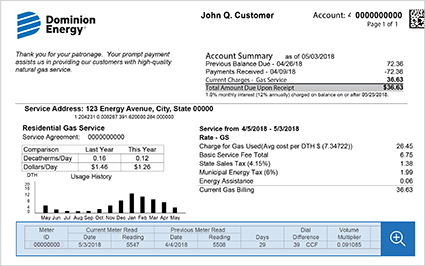
Dominion Energy delivers electricity and natural gas to millions of customers across Virginia, North Carolina, South Carolina, and other states. Paying your Dominion Energy bill on time prevents late fees, service interruptions, reconnection charges, or negative credit reporting. The company offers secure, convenient payment options through its official online account and authorized guest payment system.
Official Dominion Energy Payment Resources
- Guest Pay / One-Time Payment (or state-specific Paymentus link) – Make a quick one-time payment without creating an online account (convenience fee applies) : https://ipn4.paymentus.com/rotp/desn?ptGroup=SouthCarolinaElectric
- My Account Login & Full Payment Options – Log in to pay your bill for free from your bank account, set up AutoPay, view usage, and manage your full account.
Credit/debit card and digital wallet payments incur a convenience fee charged by the authorized vendor (Paymentus), which is disclosed before confirmation. Fees vary slightly by state (e.g., residential customers in some states pay around $1.65–$3.50 per transaction).
1. Guest Pay / One-Time Payment (No Account Required – Fastest for Quick Payments)
Dominion Energy provides a straightforward Guest Pay option for one-time payments without logging into or creating a full online account.
How to pay as a guest:
- Visit the official Guest Pay / One-Time Payment link for your state (accessible via the Pay My Bill section).
- Enter your account number and basic verification details (name/address or service address).
- Select your payment amount and choose bank account (ACH/eCheck) or credit/debit card/digital wallet (Apple Pay, Google Pay, PayPal, Venmo where supported).
- Review the convenience fee and submit for immediate confirmation.
Payments post to your account immediately or within 1–2 business days. This method is ideal for urgent payments or when you prefer not to register for a full account.
2. Pay Online via My Account (Recommended for Full Management)
The official My Account portal offers the most comprehensive and cost-effective way to manage and pay your bill.
How to pay:
- Go to the My Account login at https://login.dominionenergy.com/CommonLogin?SelectedAppName=electric and sign in (or register using your account details).
- Navigate to Billing & Payments or Make a Payment.
- Pay with your linked checking/savings account (free ACH) or credit/debit card.
- View current balance, up to 24 months of billing and usage history, and manage preferences.
The portal supports paperless eBill, usage tracking, outage reporting, and multiple account management.
3. Set Up AutoPay (Free & Reliable Recurring Option)
Enroll in AutoPay through My Account for automatic monthly deductions from your bank account on the due date. AutoPay is free, eliminates missed payments, and helps maintain good account standing. You can modify or cancel it anytime.
4. Pay by Phone
Call the customer service number listed on your bill or the state-specific support line (e.g., 1-866-366-4357 for many areas). Follow the automated prompts or speak with a representative to process payments using bank or card details.
5. Pay In Person
Use authorized payment locations or payment centers (find the nearest via the Pay My Bill page). Cash, checks, or cards are accepted at most sites. Convenience fees may apply at third-party retailers.
6. Pay by Mail
Mail a check or money order using the remittance address printed on your statement. Include the payment stub and clearly write your account number. Allow 7–10 business days for delivery and posting. Never send cash.
7. Additional Billing Options & Assistance
- Budget Billing: Average your payments over 12 months for predictable costs.
- Payment Arrangements: Available for customers facing financial hardship — contact customer service promptly.
- Energy Assistance Programs: Referrals to local and federal programs for eligible households.
Important 2026 Notes
- Fees and exact processes can vary slightly by state (Virginia, North Carolina, South Carolina, etc.). Always check your state-specific Pay My Bill page.
- Always use official dominionenergy.com domains and verified phone numbers.
- Dominion Energy never requests payment via gift cards, wire transfers, or unsolicited links.
- For gas leaks or power outages, call 911 first, then the 24/7 emergency number on your bill.
Customer Service
- General support: Use the number on your bill or the Contact Us page (state-specific).
- Hearing impaired: Relay services available.
Frequently Asked Questions (FAQs)
1. Is guest/one-time payment available for Dominion Energy bills? Yes — use the official Guest Pay option without creating a full online account.
2. What is the official login for My Account? Sign in at https://login.dominionenergy.com/CommonLogin?SelectedAppName=electric (state-specific variations may apply).
3. Are there fees for payments? Bank account (ACH) payments through My Account are free. Credit/debit card and digital wallet payments incur a convenience fee (typically $1.65–$3.50, disclosed at checkout).
4. How do I set up AutoPay? Log into My Account and follow the prompts under Billing & Payments.
5. What payment methods are accepted? Bank account (ACH), credit/debit cards, and digital wallets (Apple Pay, Google Pay, PayPal, Venmo in many states).
6. Where do I mail my payment? Use the remittance address printed on your monthly statement.
7. Can I view my usage history online? Yes — up to 24 months of bills and detailed usage data are available in My Account.
8. How quickly do online or guest payments post? Most electronic payments post immediately or within 1–2 business days.
9. What should I do if I cannot pay my full bill? Contact customer service immediately to discuss payment arrangements or assistance programs.
10. Is the Dominion Energy mobile app supported for payments? Yes — the official app allows bill viewing and payments (log in with your My Account credentials).
11. Does payment vary by state? Yes — slight differences in fees and guest pay links exist by state. Always use your state-specific Pay My Bill page.
12. Are third-party bill-pay services recommended? No. Dominion Energy only endorses its official My Account, Guest Pay, phone, mail, and in-person options to avoid extra fees or delays.